
Key Takeaways
-
01
Hardwired GPS trackers deliver the most reliable tracking for daily-driven work trucks.
-
02
OBD2 GPS trackers offer instant plug-and-play setup for trucks without wiring or downtime.
-
03
SpaceHawk magnetic GPS tracker delivers 3-second updates for trucks, trailers and assets.
-
04
Fleet platforms like Samsara and Geotab suit large multi-truck operations needing compliance tools.
-
05
Month-to-month GPS subscriptions avoid contract lock-in for small fleets and owner-operators.
As an Amazon Associate, SpaceHawk GPS earns from qualifying purchases.
Best GPS Tracking Device for Trucks | Expert Picks Based on Real-World Testing
Hey, welcome to my best tracker for trucks guide for 2026.
I’m Ryan Horban, a GPS tracking specialist with over 15 years of hands-on testing across construction sites, rental fleets, trailers, and real-world truck operations. I didn’t put this list together from spec sheets alone. I installed and ran the SpaceHawk and Konnect units on working trucks, dealt with bad signals, hidden fees, and units that looked good on paper but failed in the field. For the enterprise fleet platforms and third-party trackers in this guide, my picks come from published specifications, documented capabilities, and how each system is actually sold and deployed.
In this guide, I ranked the top 7 truck GPS tracking devices on real-world reliability, install method, tracking accuracy, alerts, and overall value. Choosing one of these options helps you avoid wasting money on trackers that lose signal, drain fast, or bury you in subscription costs.
If you’re trying to track a truck, trailer, or fleet without headaches, you’re in the right place. Let’s get into it.
 |
|
||||||||
 Buy on Amazon
Quick Overview: Best GPS Tracking Systems for Trucks (Side-by-Side)
Short on time? This overview lays everything out so you can spot the right truck GPS tracking option for your situation at a glance. Only the top performers made the cut, compared on the things that actually matter day to day.
| Tracker | Best For | Price | Top Features | Power |
|---|---|---|---|---|
| SpaceHawk | Mixed & flexible truck tracking | $39 (reg. $89) | 3-sec updates, geofence, theft recovery, optional hardwire kit | Battery, 2–3 weeks |
| Konnect OBD2 | Plug-and-play truck tracking | $8.95/mo plan | 3-sec updates, geofence & speed alerts, 1-year history | Vehicle-powered |
| Samsara | Large fleets, compliance | Custom quote | ELD, dash cam, driver safety tools, maintenance alerts | Hardwired |
| Verizon Connect | Dispatch-heavy operations | Custom quote | Dispatch tools, route planning, fleet reports | Hardwired |
| Geotab | Data-driven fleet managers | Custom quote | Deep diagnostics, fuel & idling reports, custom dashboards | Hardwired |
| Bouncie | Families, light fleets | Check current price | Trip history, safety alerts, accident detection | Vehicle-powered |
| Optimus | Budget hardwired tracking | Check current price | 30-sec updates, speed & geofence alerts, 1-year history | Hardwired |
How We Picked the Best GPS Tracking Device for Trucks
This guide isn’t based on spec sheets, hype, or whoever shouts the loudest online. I put this list together after running the trackers I sell and support under the same conditions truck owners and fleet managers deal with every day, and by evaluating the rest against documented capabilities and how they’re actually deployed.
The SpaceHawk and Konnect units ran on active routes with real pressure: stop-heavy schedules, tight urban streets, long highway stretches, and overnight parking where trackers usually fail. That kind of use exposes problems fast.
Some were plugged in and others were hidden. A few got moved between vehicles to see how well they handled real abuse, because trucks don’t live gentle lives.

What I focused on
When I narrowed everything down, I paid attention to the things that actually affect truck tracking.
Tracking reliability while moving
How well a tracker keeps up during stop-and-go routes. Dropped updates and lag didn’t make the cut.
Update speed and consistency
Faster refresh rates mattered, especially when trucks were active. Some units claim “real-time” but behave more like “eventually.”
Installation type and tamper risk
Visible OBD2 trackers compared against hidden and hardwired units, to see which stay active without interference.
Accuracy in real environments
Tight streets, job sites, and mixed driving conditions expose inaccurate trackers quickly.
Flexibility across truck use cases
Trucks, trailers, vans, and equipment, to see which units adapt without extra hardware or headaches.
Ongoing maintenance and reliability
Battery life, power options, and how often a tracker needs attention all mattered. Anything that needed babysitting dropped down the list.
I then ranked each device on which trackers deliver consistent, accurate data in real use without adding setup friction, maintenance work, or unnecessary complexity. The ones that stay reliable, stay online, and stay easy to live with are the ones that made this list.
With that context out of the way, let’s start with the tracker that outperformed everything else in real truck use and earned the top spot.
1) SpaceHawk Hidden GPS: Best Overall GPS Tracker For Trucks
 |
|
||||||
SpaceHawk combines fast real-time updates, strong accuracy, and flexible power options in a single mini-GPS unit. You can run it on battery for short-term tracking or hardwire it for nonstop operation, which is something many truck GPS tracker units don’t offer in one package.
That flexibility is why it earns the top spot on this list.
Key Features
- Mini magnetic GPS tracker with a rugged, waterproof housing designed for exterior mounting
- Real-time GPS tracking with update intervals ranging from seconds to minutes
- Global coverage in 150+ countries, suitable for cross-state and cross-border operations
- Built-in SIM card with flexible, month-to-month subscription options
- Multiple battery modes, including low-power settings for extended deployments
- Optional hardwired power kit for nonstop, vehicle-powered tracking
- Mobile app access on iOS, Android, and desktop for quick location checks
Pros & Cons
Pros
- Installs in minutes using a strong magnetic mount, avoiding downtime or shop visits
- Delivers reliable real-time updates, which helps with theft recovery and route verification
- Works equally well on trucks, trailers, and equipment, so you’re not locked into one use case
- Optional hardwired setup eliminates battery anxiety for long-term truck tracking
- The app interface stays simple, making it easy to check a vehicle’s location without training
- Speed and geofence alerts help flag unsafe driving and unauthorized vehicle use early
Cons
- Subscription required for live GPS tracking and alerts
- The battery needs occasional charging if you don’t hardwire it

I mounted SpaceHawk under a work truck frame and ran it through daily routes, overnight parking, and long highway drives. The magnet held firm the entire time, even after rain and road grime, so I never worried about it shifting or dropping.
Real-time updates came through consistently. I checked truck GPS tracking from my phone several times a day, and location data refreshed quickly enough to confirm arrivals and departures without delay. Speed alerts and geofence notifications worked well. What I liked most was how predictable it felt.
Once I connected the optional hardwired kit, the tracker stayed powered continuously and ran in the background without attention. That’s exactly what you want from a GPS truck tracking solution.
Go with SpaceHawk GPS if you want the best GPS tracking system for trucks that installs fast, tracks accurately, and adapts to how you actually use your vehicles.
 |
|
||||||||
2) Konnect OBD2 Vehicle Tracker: Best Plug-and-Play GPS Tracking Device for Trucks
 |
|
||||||
Konnect focuses on speed and simplicity. You get some of the fastest real-time updates available in an OBD2 format, paired with a low, flat subscription cost. Compared to magnetic or battery-powered units, there’s nothing to charge and nothing to mount. That makes it a strong second pick when convenience is the priority.
If you want tracking without tools, wiring, or guesswork, these are the details that actually affect day-to-day use.
Key Features
- Plug-and-play OBD2 design, connects directly to the vehicle port in under a minute
- LTE/4G connectivity with rapid location refreshes, delivering real-time updates as fast as every 3 seconds during active movement
- High-precision GPS accuracy, typically within about 6 feet in normal driving conditions, including urban and job-site environments
- Built-in SIM card with a simple, flat monthly data plan, priced at $8.95 per month with no complicated tiers
- Wide global coverage across 150+ countries, suitable for cross-state operations and international travel when needed
- Speed alerts and geofence notifications, allowing oversight of routes, zones, and driving behavior without constant monitoring
- One full year of stored location history, including route playback to review trips, stops, and travel patterns
- Lifetime manufacturer’s warranty backed by U.S.-based human support, providing long-term reliability and real assistance when needed
Pros & Cons
Pros
- Installs instantly through the OBD2 port, avoiding shop visits or vehicle downtime
- Fast real-time updates allow route and stop checks without noticeable delay
- Draws power directly from the vehicle, so there’s no charging or battery upkeep
- Clean, simple app layout makes checking vehicle location quick and intuitive
- Affordable monthly plan with no contracts, hidden fees, or surprises
- Fits trucks that return to base regularly or run predictable, fixed routes
Cons
- Requires an accessible OBD2 port, which not all vehicles expose easily
- Can be unplugged intentionally, since the device remains visible
- Does not report harsh braking or idling detection

I plugged the Konnect OBD2 tracker into a work truck and had live tracking showing up on my phone within minutes. Once it was active, location updates refreshed quickly enough that I could watch the truck move in real time along its route. During testing, I used speed alerts and geofence notifications to keep an eye on route compliance.
Konnect made it easy to confirm whether a truck stayed on task or took an unplanned detour. For trucks running daily service routes, that kind of visibility helps control fuel usage and reduce unnecessary mileage.
What I liked most was not having to think about power at all. Because it pulls power from the vehicle, the tracker stays online continuously. That reliability is a big plus if you want a GPS truck tracking solution that’s always ready the moment the engine turns on.
Choose the Konnect OBD2 Vehicle Tracker if you want the fastest, easiest way to track trucks that support OBD2.
Tracking a truck someone else drives? Read this first
Everything in this guide assumes you own or hold the title to the vehicle. Placing a tracker on property you do not own, without the owner’s consent, can bring criminal charges and civil liability. Several states treat non-consensual tracking of a person as stalking or unlawful surveillance, and tracking a spouse, partner, or ex without their agreement is not a grey area.
Company ownership of the truck is not the whole answer either. Drivers are people, and some states and union agreements require notice or consent before you monitor an employee’s vehicle. Get written driver consent, put a written monitoring policy in place, and confirm your state’s rules before the first device goes on.
 |
|
||||||||
3) Samsara: Best GPS Tracking System for Large Commercial Trucks & Fleets

Samsara is an enterprise-grade GPS fleet tracking system aimed at commercial trucking operations. Samsara combines hardwired GPS hardware with cloud-based fleet tracking software, giving you real-time location data, compliance tools, and safety oversight from one platform.
Let me be straight: Samsara does not target single-truck owners. The platform serves multi-vehicle fleets and is typically sold with minimum vehicle counts and long-term service agreements. The platform fits large fleets, regulated carriers, and companies that must manage drivers, logs, maintenance, and safety at scale. If you’re overseeing dozens or hundreds of trucks, Samsara centralizes control and reduces risk across the fleet.
Samsara doesn’t stop at showing where trucks are. The platform ties truck GPS tracking to compliance, vehicle diagnostics, and safety tools in a single ecosystem. That level of integration is why big commercial fleets lean toward it.
Before the verdict, here’s what actually defines Samsara in day-to-day fleet use.
Key Features
- Hardwired GPS hardware with constant vehicle power for uninterrupted tracking
- Real-time truck tracking with frequent updates and detailed trip history
- Built-in ELD and DOT compliance tools for regulated operations
- Driver behavior monitoring covering speeding and safety events
- Vehicle diagnostics with maintenance alerts and fault-code reporting
- Dash cam integration for incident review and safety programs
Pros & Cons
Pros
- Combines GPS tracking, compliance, safety, and maintenance in a single platform
- Constant power keeps vehicles tracked without gaps or battery concerns
- Clear visibility into driver behavior for safety-focused operations
- A centralized dashboard simplifies tracking, reporting, and oversight
Cons
- Costs more than basic GPS trackers for trucks, especially if you only need location data
- Installation typically requires a professional, adding time and setup effort
- Too much system for owner-operators or small fleets with simple tracking needs
- More features than you’ll use if you only need location tracking

On multi-vehicle setups where compliance and accountability are non-negotiable, Samsara’s appeal is consistency: once the hardware is wired in, every truck reports continuously, with routes, stops, and idle time laid out on one dashboard.
The real differentiator is context. Location data ties directly into driver behavior and maintenance alerts, so there’s no jumping between platforms. When a driver pushes speed limits or a vehicle throws a fault code, the system flags it, which helps stop small issues from turning into expensive downtime.
Next to trackers like Bouncie or Konnect, Samsara is heavier, and that’s intentional. Those tools focus on fast answers. Samsara focuses on managing fleets. If you’re overseeing drivers, compliance, and vehicle health, that depth can justify the cost.
Still, I wouldn’t recommend it for a single truck or a small operation. You’d be paying for systems you won’t fully use.
Choose Samsara if you manage a large commercial fleet and need GPS tracking tied directly to compliance, safety, and maintenance.
4) Verizon Connect: Best GPS Tracking System for Dispatch & Route Optimization

Verizon Connect is a fleet-focused GPS tracking system that combines hardwired vehicle trackers with capable fleet tracking software. The platform helps dispatchers see vehicle locations in real time, assign jobs efficiently, and review routes after the fact. The system fits service fleets, delivery operations, and regional trucking companies that depend on efficient routing and timely dispatch.
Verizon Connect also isn’t aimed at single-vehicle tracking. The product sells as a fleet platform, usually with contracts and pricing that only make sense when managing multiple trucks. If your priority is keeping trucks moving on schedule and cutting unnecessary mileage, Verizon Connect supports that goal.
Dispatch and route optimization sit front and center here. Rather than acting as a simple GPS tracker for vehicle location, it ties tracking data into daily operations, helping fleets plan routes, manage idling time, and improve efficiency. That operational focus is why it lands in this spot.
These are the capabilities that shape Verizon Connect as a truck GPS tracking system for operations-heavy fleets.
Key Features
- Hardwired GPS hardware with constant vehicle power, ensuring uninterrupted tracking without battery or charging concerns
- Real-time truck tracking with detailed trip history, including full route playback to review stops, mileage, and travel patterns
- Dispatch tools for job assignment and live vehicle visibility, helping teams see which truck is closest and available
- Route planning features that reduce idling time and wasted miles, supporting more efficient daily operations
- Driver behavior insights, covering speeding and harsh driving indicators to support safer driving practices
- Fleet tracking software accessible on desktop and mobile, allowing managers to monitor vehicles from anywhere
Pros & Cons
Pros
- Strong dispatch and route planning tools, well suited for service-based fleets with scheduled jobs
- Reliable real-time tracking that stays consistent throughout the workday, even on stop-heavy routes
- Maintenance alerts help prevent unexpected downtime, reducing surprise repairs and service delays
- A centralized dashboard keeps tracking and reporting organized, eliminating the need to jump between tools
- Handles multiple daily stops and routes effectively, making it a solid fit for busy fleet operations
Cons
- Professional installation is usually required, adding setup time compared to plug-and-play trackers
- Feels like a complex system if you only want simple location tracking
- Long-term contracts are common, often required to onboard
- Overbuilt for one or two trucks, where dispatch tools and reporting go largely unused

In environments where dispatch speed and route clarity are critical, Verizon Connect earns its keep. Trucks show up on the dashboard consistently, with routes and stops clearly mapped, and dispatchers can see which vehicle is closest to the next job without calling drivers back and forth.
Route review is the standout. After a shift, a manager can look back at where trucks went, how long they idled, and whether routes stayed efficient. That kind of visibility helps control fuel consumption and keeps operational costs from creeping up over time.
Next to lighter solutions like SpaceHawk, Verizon Connect demands more setup and commitment. But for fleets that live and die by schedules, that extra structure pays off.
Go with Verizon Connect if dispatch efficiency, route planning, and operational control sit at the top of your priority list. That makes it a solid fit when you need a truck GPS tracking system that supports daily fleet operations.
5) Geotab: Best Hardwired Truck GPS Tracking System for Data-Driven Truck Fleets

Geotab is a hardwired GPS fleet tracking system that connects directly to a truck’s electrical system. Geotab provides real-time location data along with diagnostics, fuel tracking, and maintenance insights for continuous, long-term monitoring.
Geotab is not built for single trucks. The system fits fleet managers and commercial trucking operations that want consistent data across many vehicles. While one vehicle can technically be tracked through a reseller, the platform, pricing, and reporting all assume multi-vehicle operations and long-term use.
Geotab earns its place when decisions around fuel expense, maintenance schedules, and driver behavior affect overall profitability. The platform treats GPS truck tracking as a data source, not just a location tool. By combining hardwired reliability with analytics, it helps fleets identify inefficiencies, reduce fuel consumption, and plan maintenance instead of reacting to breakdowns.
Geotab targets permanent installs on working trucks, and these are the features that actually matter when you hardwire a tracker into a commercial vehicle.
Key Features
- Real-time GPS truck tracking with full trip history, including detailed route playback to review stops, mileage, and travel paths
- Advanced vehicle diagnostics with fault-code reporting, helping identify issues before they escalate into breakdowns
- Fuel usage and idling reports that highlight inefficiencies and support fuel cost control
- Driver behavior monitoring tied to safety and efficiency, offering insight into patterns that affect risk and wear
- Maintenance tracking with automated service reminders, keeping vehicles on schedule and reducing unexpected downtime
- Custom dashboards and long-term reporting tools, giving fleet managers clear visibility into trends over time
Pros & Cons
Pros
- Hardwired constant power delivers uninterrupted truck GPS tracking with no battery concerns
- Deep diagnostics help catch maintenance issues before they cause downtime
- Fuel and idling data support long-term cost reduction strategies
- Reporting tools make trend analysis across fleet vehicles straightforward
- Scales cleanly across large commercial fleets
Cons
- Requires professional hardwired installation, adding setup time and initial effort
- Typically sold through resellers with contract-based plans, not month-to-month options
- Not practical for single-truck owners, as the analytics and cost structure assume fleet-scale usage
- Takes longer to set up than plug-and-play GPS trackers, especially for first-time installs
- Costs increase as vehicles and reporting features are added, raising long-term expenses

On trucks running daily routes where uptime matters more than convenience, Geotab’s value shows up over weeks rather than minutes. Once the units are hardwired, tracking stays consistent day after day, and patterns surface: fuel usage differences between trucks become obvious, and idling habits are easy to spot. That kind of visibility helps fleet managers tighten operations without guessing.
Compared with lighter truck GPS tracker units, Geotab asks more of you upfront. Installation takes planning, and the dashboard rewards regular review. But for fleets that operate on data, it delivers insight simpler tracking solutions can’t.
Go with Geotab if you want a hardwired GPS tracking system for trucks that supports long-term fleet optimization. Geotab is the right choice when analytics, maintenance planning, and fuel efficiency drive how you manage your fleet.
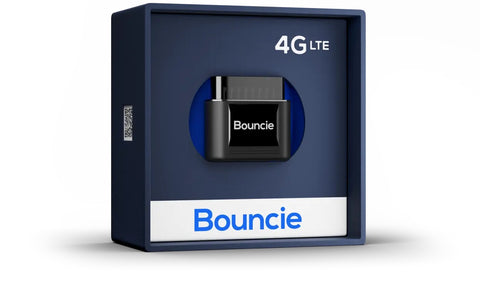
6) Bouncie: Best OBD2 GPS Tracker for Semi Trucks & Light Fleets
 |
|
||||||
This tracker works best for families, small teams, and light fleets that want visibility and safety features in one place. Bouncie suits monitoring teen drivers, company cars, or service vehicles where accountability and quick alerts matter more than covert tracking.
Bouncie blends GPS tracking with safety and vehicle health features. Accident detection, driving behavior alerts, and diagnostic insights come built in, so you can understand what’s happening behind the wheel rather than just where the vehicle sits. That balance is what puts it on this list.
If you want a plug-in tracker focused on visibility and safety without wiring, these are the points that shape day-to-day use.
Key Features
- OBD2 plug-and-play GPS tracker that works on most vehicles from 1996 onward, allowing quick installation without tools or wiring
- 4G LTE CAT-M1 connectivity delivers real-time location updates, keeping tracking responsive during active trips
- Unlimited trip and route history powered by Google Maps, with both street and satellite views for clear playback
- Driving behavior insights, including speed monitoring, hard braking, rapid acceleration, and idling activity
- Geofence alerts combined with automatic accident detection, sending SMS notifications when events occur
- Vehicle health monitoring with diagnostic trouble code alerts, helping spot issues before they turn into breakdowns
Pros & Cons
Pros
- Installs in seconds through the OBD2 port, avoiding tools, wiring, or vehicle downtime
- Real-time tracking combined with detailed trip history makes route reviews quick and clear
- Driving behavior insights support safer habits, useful for family drivers or small teams
- Accident detection and instant alerts add an extra layer of awareness beyond basic tracking
- Draws power directly from the vehicle, so there’s no battery charging or upkeep
- Simple, intuitive app design makes tracking easy without any learning curve
Cons
- OBD2 placement keeps the device visible, so it can be unplugged intentionally if someone knows where to look
- Coverage is limited to North America, which may not fit cross-border or international use
- Offers fewer customization options for large, compliance-heavy commercial fleets

Bouncie’s pitch is immediacy. Plug it into a daily-use vehicle and live tracking appears almost right away, with route history filling in automatically. Reviewing a drive later surfaces speed bands and events clearly, which helps explain why certain trips took longer or used more fuel.
The safety angle is where it separates from the pack. Speeding and hard-braking alerts arrive quickly, and accident detection adds another layer: if something happens, contacts get notified without anyone needing to open the app.
Compared with Konnect, Bouncie leans toward safety and family use rather than pure speed. Updates are fast enough for oversight, and the vehicle health alerts help catch small issues early. Bouncie is not meant for hidden installs, but for cars and light trucks it’s straightforward and dependable.
Pick Bouncie if you want an easy OBD2 GPS tracker that combines real-time location with safety alerts and driving insights.
7) Optimus GPS: Best Budget Hardwired Truck GPS Tracking System
 |
|
||||||
This tracker fits owner-operators, small fleets, and budget-conscious businesses that want reliable truck tracking without paying enterprise-level subscription costs.
Optimus handles basic route monitoring, prevents unauthorized use, and supports theft recovery.
Optimus competes on price and simplicity. You get a permanently powered GPS tracker with clear alerts and reports at a much lower upfront cost than most hardwired systems. Nothing flashy, but it covers the job consistently. That’s why it earns a place on this list for cost-focused buyers.
If you’re after a hardwired GPS tracker that keeps costs down but still covers the basics, these are the specs that define Optimus in real use.
Key Features
- Hardwired GPS tracker that connects directly to the vehicle’s battery, using a simple two-wire installation for constant power
- Real-time GPS location updates every 30 seconds, with additional pings on turns to improve route accuracy
- Nationwide tracking coverage across the U.S. and Canada, suitable for local and cross-border operations
- Speed monitoring with harsh driving detection, tracking braking, acceleration, and cornering behavior
- Email and text alerts for key events, including movement, speeding, geofence entry or exit, and power disconnection
- One full year of trip and route history stored, available for review during active service
- SIM card and data plan included, with clear monthly pricing and no hidden fees
Pros & Cons
Pros
- Very low upfront device cost compared to most truck GPS tracker units, making it accessible for budget-focused tracking needs
- Hardwired power eliminates battery charging, helping reduce tracking gaps and ongoing maintenance
- Straightforward alerts for speed, movement, and geofence activity, covering the essentials without extra complexity
- Historical driving reports make it easy to review routes and habits, supporting basic oversight and accountability
- Flexible subscription plans with no contracts or hidden fees, keeping long-term costs predictable
Cons
- Installation requires access to the vehicle battery and basic wiring, which may take extra setup time
- Update intervals are slower than 3-second trackers, making it less suitable for live route monitoring
- Coverage is limited to North America, which won’t fit international operations
- The feature set stays basic compared to full fleet tracking systems, focusing on essentials only
Optimus wires directly to a vehicle battery: positive and negative connections, secure the placement, and it goes live shortly after activation. The setup is about as simple as hardwiring gets.
Updates arrive at regular intervals, and while they aren’t instant like 3-second systems, they’re consistent enough to follow routes accurately. Speed and geofence alerts land reliably by text and email. Stability is the selling point — once wired, the tracker stays powered and predictable, and for basic truck tracking that reliability goes a long way.
Optimus doesn’t dig deep into diagnostics or analytics compared with systems like Geotab or Samsara. But if your goal is affordable, always-on GPS tracking without contracts, it delivers exactly that.
Choose Optimus GPS if you want a budget-friendly hardwired GPS tracking system for trucks that covers the essentials without locking you into expensive plans.
Buying Guide: How to Choose the Best GPS Tracking System for Trucks

Choosing the right GPS tracking system for trucks comes down to a few practical decisions:
- How your trucks are used
- How quickly you need location updates
- How the tracker gets power
- Which alerts you’ll actually act on
- What the long-term cost looks like
Get those right, and truck tracking feels simple and dependable. I’ve seen truck owners buy systems based on price or “real-time” claims, only to realize later that the update speed didn’t match their routes, the power setup didn’t fit their trucks, or the alerts didn’t reflect how they actually operate.
So rather than starting with features, I start with how trucks really run: day routes, overnight parking, job sites, trailers, and long highway miles. That’s the only way to choose a truck GPS tracking system that works in the real world.
Let’s break it down step by step.
1) Start With How You’ll Use the Tracker
This is the first thing I tell everyone, before we talk specs or pricing: if you don’t know exactly what you’re trying to track, every GPS tracker will look “right” and still end up wrong.

So let me ask you the same questions I ask truck owners and fleet managers:
- Do you just want to know where a truck or trailer is right now?
- Are you trying to stop after-hours use or unauthorized trips?
- Or are you managing drivers, routes, fuel usage, and safety across multiple vehicles?
If all you need is location visibility and theft recovery, you don’t need an enterprise fleet system. A solid truck GPS tracker will handle that without draining your budget or your patience. But if you’re checking routes daily, reviewing driver behavior, and watching fuel costs creep up, you’ll want a full fleet tracking system that gives you ongoing oversight.
From my experience, this single decision wipes out half the wrong options immediately. Get this part clear first, and everything else gets much easier.
If your trucks run stop-heavy delivery or courier routes, tracking needs change fast. See our full breakdown of the Best GPS Tracker for Delivery Fleets & Couriers in 2026, based on real-world testing across stop-heavy routes and daily dispatch operations.
2) Tracker Type & Installation: Portable vs Plug-and-Play vs Hardwired
This is the next decision I help people sort out, because installation type affects reliability more than most specs ever will. If the tracker doesn’t fit how your trucks operate, even a good device becomes frustrating.
Trucks aren’t treated gently. They run long hours, sit overnight, get moved between jobs, and sometimes get used when they shouldn’t be. How a tracker gets power, and how easy it is to remove, directly affects whether it stays online when you actually need it.

First, the three tracker types by installation and power source:
Portable (Battery-Powered)
Best when you need flexibility and want to move or reuse the tracker across trucks, trailers, equipment, or temporary jobs where no vehicle power is available. You just place it.
Plug-and-Play (OBD2)
Best for quick setup on pickup trucks and service vehicles where convenience matters more than concealment. Works on any asset with an OBD port.
Hardwired
The most dependable option for trucks in daily service, wired straight into the vehicle’s electrical system. Installation takes more effort, or a professional.
Before choosing, think about whether the tracker will stay on one truck or move between vehicles, whether you need concealed tracking or easy access, and whether you want to avoid dealing with batteries altogether. Answer those honestly, and the right tracker type becomes obvious. Get this part right, and accuracy, alerts, and overall reliability fall into place much more smoothly.
Installation plays a big role in long-term reliability. For a clearer picture of what setup actually looks like, see our Fleet GPS Tracker Installation Guide: Step-by-Step Setup.
3) Update Speed: How “Real-Time” Do You Really Need?
Update speed is how often a GPS tracker refreshes a truck’s location while it’s moving. When a system says “real-time,” it means the tracker sends location pings at fixed intervals, such as every few seconds or every minute. Faster updates give you a clear view of where a truck is at the moment, which helps with dispatching, route checks, and confirming arrivals without second-guessing.

Slower updates work for reviewing trips later, but they don’t provide the same clarity during active routes.
For live visibility and route verification, look for update speeds in the 3–5 second range. If you mainly review trip history or mileage, 30–60 second updates are usually sufficient. Always check the actual refresh interval, because “real-time” can mean very different things once the tracker is in use.
4) Coverage Area
Coverage area is where the GPS tracker can reliably send location data. Most truck GPS trackers work well inside the U.S., but coverage can change once trucks cross state lines or borders.
If a tracker loses signal outside its supported region, tracking gaps appear right when you need visibility. That’s how trucks go “dark” on long routes or cross-border runs. If your operation is local or regional, USA-only coverage is usually enough. If trucks cross into Canada or Mexico, look for North America coverage. Only choose global coverage if your routes truly demand it.

Otherwise you’ll pay every month for coverage your trucks never touch. The rule I follow is simple: match coverage to real routes, not future “what-ifs.”
5) Subscription Costs & Hidden Fees
Most GPS tracking systems rely on a monthly subscription to cover cellular data, platform access, and ongoing tracking services. That’s standard across truck GPS trackers, whether basic or fleet-level. GPS data plans and pricing affect your long-term cost far more than the device price.
A low-cost tracker can become expensive if fees increase later, or if you’re locked into a contract that doesn’t fit how your operation changes.
Look for month-to-month plans rather than long contracts until you’re certain you need tracking long-term, and confirm there are no activation, cancellation, or surprise service fees. Pay attention to pricing after promotional periods end. From my experience, flat-rate plans with clear terms are the easiest to manage and create the fewest issues over time.
6) Extra Useful Features
Many GPS tracking systems include add-ons like alerts, reports, diagnostics, and video. Some of these support day-to-day truck tracking. Others exist mainly for large fleet operations. Extra features only help if you actually use them. Otherwise they add complexity, clutter dashboards, and increase costs.
I’ve seen small operators pay for fleet analytics they never open, while missing simple alerts they actually needed. For most truck owners, focus on features that support clear visibility and everyday control. These are the ones you’ll actually use:
Geofence alerts
Get notified when a truck enters or leaves specific areas like job sites, yards, or off-limit zones.
Speed alerts
Know when a truck exceeds set speed limits so you can address risky driving early.
Route history
Review where a truck has been, how long it stopped, and which routes were taken.
Theft recovery
Quickly locate a truck if it’s moved without authorization.

More advanced tools suit larger fleets with dedicated managers and structured workflows:
- Driver behavior monitoring: Track patterns like harsh braking or aggressive driving across multiple drivers.
- Maintenance alerts: Schedule service based on mileage or engine data to reduce unexpected downtime.
- Fuel usage reports: Analyze consumption and idling trends across the fleet.
- Dash cam integration: Review incidents, improve safety programs, and handle disputes.
These features make sense when you’re managing several vehicles and reviewing data regularly. For smaller operations, they often create more noise than value.
 |
|
||||||||
Final Advice: Choosing the Right GPS Tracking System for Trucks
The best GPS tracking system for trucks is the one that fits how you actually use your vehicles, nothing more, nothing less.
- If you only need location visibility and theft recovery, keep it simple.
- If you manage drivers, routes, and operating costs, step up to a fleet-grade system.
- If you track trailers or equipment, flexibility with battery-powered trackers becomes important.
Conclusion: Which GPS Tracking System for Trucks Should You Choose?
If you’ve made it this far, you already know there’s no single “perfect” tracker for everyone. Based on real use, one rule matters most: don’t overthink it. Match the tracker to your use case, not the other way around.
The best GPS tracking system for trucks is the one that solves your specific tracking problem without adding cost, complexity, or features you’ll never use, and that matches how you actually run vehicles day to day.
Go with SpaceHawk GPS if you want the safest all-around option. SpaceHawk is flexible, discreet, works on trucks, trailers, and assets, and gives you fast, accurate tracking without unnecessary complexity. For most truck owners and small fleets, this is the easiest decision. Choose the Konnect OBD2 Vehicle Tracker when you want true plug-and-play tracking with constant power and fast updates the moment the truck is running.
For larger, operations-heavy fleets: go with Samsara if compliance, safety programs, and maintenance oversight are mandatory. Choose Verizon Connect if dispatch, route planning, and daily operations drive your business. Pick Geotab if data, fuel efficiency, and long-term optimization guide your decisions. And pick Bouncie for families and light fleets where safety, driving behavior alerts, and accident notifications matter more than hidden installs.
Good GPS tracking is about removing doubt. Once you match the tracker to your real needs and install it, you stop guessing, stop worrying, and start making decisions with confidence.
That’s exactly what this guide is meant to help you do.
|
|
||||||||