


Key Takeaways
-
01
Best AirTag alternative are SmartTag 2 for Galaxy, Chipolo Pop for iPhone, SpaceHawk for cars.
-
02
Samsung SmartTag 2 offers the closest AirTag experience for Samsung Galaxy users.
-
03
Chipolo Pop works with Apple Find My and Google Find Hub networks.
-
04
Bluetooth trackers are best for keys, wallets, luggage, and other everyday items.
-
05
Real-time GPS trackers provide better protection for vehicles, trailers, and valuable assets.
What Are the Best AirTag Alternatives in 2026?
The best AirTag alternatives in 2026 are the Samsung Galaxy SmartTag 2 for Android users, the Chipolo Pop for dual-network flexibility, the Tile Pro for mixed iPhone and Android households, and the SpaceHawk mini GPS tracker for real-time vehicle and asset tracking for both Android and Apple users.
Looking for the best AirTag alternatives in 2026? The right tracker depends on what you're tracking, how you want to track it, and whether you use an iPhone or Android phone.
I'm Ryan Horban, a GPS tracking specialist who's spent more than 15 years testing trackers in real-world conditions.
AirTags are popular for a reason, but they're not always the best tracker for the job. Android users need a different solution entirely, and even iPhone users often want features, form factors, or tracking options that AirTags don't provide. That's where the right AirTag alternative can make a big difference.
In this guide, I'll break down the best AirTag alternatives I've personally tested, explain the different tracking technologies, and show you which option makes the most sense for your situation. By the end, you'll know exactly which tracker fits your phone, your budget, and what you're trying to protect.
Let's find the tracker that fits your life, not just the one everyone else is buying.

The AirTag Alternative That Actually Tracks in Real Time
Real-Time GPS | Works on Both Android and iPhone
No Bluetooth limits. No iPhone dependency. SpaceHawk updates as often as every 3 seconds on any Android or iPhone, anywhere in the world.
- Works on Android & iPhone
- Real-time GPS, not Bluetooth
- Updates as fast as 3 sec
- 150+ countries coverage
- Hidden magnetic mount
- ~6 feet accuracy
What Can A GPS Tracker Do? Real-Time Tracking Beyond AirTag Bluetooth Limits
Our Top Picks: Best AirTag Alternatives
Before we get into the details, here's a quick side-by-side look at the best AirTag alternative trackers I'd consider in 2026.
| Comparison | Samsung SmartTag 2 | Chipolo Pop | Tile Pro | Pebblebee Clip 5 | Moto Tag | Ugreen FineTrack | SpaceHawk GPSOur Brand |
|---|---|---|---|---|---|---|---|
| Product |  |
 |
 |
 |
 |
 |
 |
| Best For | Android Users | Dual-Network Flexibility | Mixed iPhone + Android Homes | Rechargeable Convenience | Google Find Hub + UWB | Budget Find My Tracking | Cars, Trailers & Assets |
| Tech Type | Bluetooth + UWB | Bluetooth | Bluetooth | Bluetooth | Bluetooth + UWB | Bluetooth | Cellular GPS |
| Network | Samsung SmartThings Find | Apple Find My + Google Find Hub | Tile / Life360 | Find My + Find Hub | Google Find Hub | Apple Find My | GPS Satellites + 4G LTE |
| Unwanted-Tracking Alerts | Galaxy alerts + manual scan | iPhone + Android alerts | Manual scan in Tile app | iPhone + Android alerts | iPhone + Android alerts | iPhone alerts (Find My) | Built for vehicles and assets you own |
| Real-Time? | No | No | No | No | No | No | Yes, as often as every 3 sec |
| Battery | Up to 500 days | ~1 year | ~1 year | ~12 months | ~1 year | Up to 2 years | 1-3 wks regular / 3-6 mo low power |
| Price | ~$18-$30 | $29 | $34.99 | ~$30-$35 | ~$20-$29 | ~$20 | $39.95 |
| Where to Buy | Buy on Amazon | Buy on Amazon | Buy on Amazon | Buy on Amazon | Buy on Amazon | Buy on Amazon | Buy on Website |
Prices reflect U.S. listings at the time of writing and will move around during sales.
How Does Apple AirTag Work?
Apple AirTag works by sending out a Bluetooth signal that nearby iPhones, iPads and Macs pick up and report back to you in the Find My app. Apple describes that Find My network as hundreds of millions of Apple devices, and every report stays encrypted and anonymous.
Up close, AirTag uses Ultra Wideband for Precision Finding, so your iPhone points you straight to the tag. The AirTag (2nd generation) Apple released in January 2026 adds a second-generation UWB chip, finds items from up to 50 percent farther away and has a speaker that is 50 percent louder. Pricing stayed at $29 for one or $99 for a four-pack.
Power comes from a replaceable CR2032 coin cell you swap about once a year. The bigger catch is your phone. AirTag only sets up with an iPhone or iPad, so Android users are locked out, and no AirTag gives you live tracking. Those two gaps are the reason every tracker below exists.
Let's see which tracking technologies AirTag alternatives use.
The 3 Types of AirTag Alternatives (Know This Before You Buy)
Before you choose any tracker from this list, you need to understand the three tracking technologies behind them. Every AirTag alternative uses one of three tracking technologies: Bluetooth, crowd-network tracking, or real-time GPS and each type solves a different problem.

A tracker can have great reviews, a long battery life, and a low price. None of that helps if it's built for a completely different job than the one you need it to do.
I've had people tell me their tracker "stopped working" after a trailer disappeared from a storage lot. When I looked into it, the tracker was doing exactly what it was designed to do. The problem was the technology they were using a Bluetooth tag for a job that needed real-time GPS tracking.
Once you understand the three categories below, choosing the right tracker becomes a lot easier.
1. Bluetooth Trackers (BLE)

A Bluetooth tracker is a small coin-style tag that connects directly to your phone over Bluetooth, usually within about 100 to 500 feet depending on the device and environment. If something goes missing nearby, you open the app, trigger the alarm, and follow the sound. Most Bluetooth trackers produce between 80 and 128 decibels, which is usually loud enough to hear from another room.
This is the type of tracker most people use for keys, wallets, backpacks, remotes, and other everyday items.
One reason these trackers are so popular is battery life. Most use a replaceable CR2032 battery and can run for about a year before needing a replacement. But the limitation is once the tracker moves beyond Bluetooth range, it loses direct contact with your phone. On its own, a Bluetooth tracker can't tell you anything.
2. Crowd-Network Tags (Apple Find My and Google Find Hub)

Crowd-network tags such as Apple Find My or Google Find Hub network tags use nearby phones to help locate lost items, even when they're outside your Bluetooth range.
When a tagged item moves out of range, nearby iPhones or Android devices can anonymously detect it and securely relay its location back to you. That makes crowd-network trackers much more effective than standard Bluetooth trackers that only work within direct Bluetooth range.
The scale behind these networks is one of their biggest advantages. Apple's Find My network runs on hundreds of millions of Apple devices, while Google's Find Hub network continues to expand across Android devices in the United States.
In my experience, crowd-network trackers work best for:
- Luggage moving through airports and hotels.
- Wallets, backpacks, and everyday carry items.
- Lost belongings in busy areas where phones are everywhere.
The trade-off shows up when the tracker leaves the crowd. Location updates only happen when another compatible phone comes close enough to detect it.
If your tagged item ends up in a rural area, a remote storage yard, or an empty parking lot in the middle of the night, updates can slow down dramatically because there simply aren't enough nearby devices feeding location data back into the network.
3. Real-Time GPS Trackers

A real-time GPS tracker calculates its own location using GPS satellites and sends that data through a cellular connection. Unlike Bluetooth trackers, it doesn't rely on nearby phones to report its location. GPS tracking works especially well for vehicles, trailers, equipment, and other valuable assets.
In practice, that unlocks what Bluetooth physically can't do:
- Live location updates as often as every 3 seconds while something moves.
- Geofencing, so you get an alert the moment your car or trailer leaves a set boundary.
- Location history that shows where an asset went, not just where it sits now.
- Theft protection that keeps working in dead zones where no iPhone will wander past.
I've tested Bluetooth trackers and GPS trackers in the same low-traffic areas, and the difference is hard to miss. A Bluetooth tracker waits for a nearby phone. A GPS tracker reports its location on its own.
How I Tested These AirTag Alternatives
Every tracker in this guide was purchased independently and tested in real U.S. conditions, not judged from a spec sheet.
I put these trackers through situations you'll likely face yourself: checked luggage on multi-flight trips, toolboxes on job sites, vehicles parked overnight in low-traffic areas, and the daily keys-wallet-backpack routine over several weeks.

While filtering the field to these seven picks, I focused on:
- Update performance when nearby phones were limited.
- Real-world battery life versus manufacturer claims.
- App experience when finding a missing item quickly is important.
- Alert reliability for left-behind and movement notifications.
- Total ownership cost, including subscriptions, batteries, and accessories.
A tracker didn't make this list if it struggled with connectivity, delivered inconsistent updates, or locked important features behind unexpected paywalls.
I also compared my testing results against brand specifications to see how closely real-world performance matched the advertised numbers. The recommendations start with the tracker I suggest most often to Android users.
Affiliate Disclosure: I may earn a small commission if you purchase through Amazon links in this guide. There is no additional cost to you. SpaceHawk is our own brand, ranked #7 below. Product rankings are based on hands-on testing, real-world performance, features, value, and overall usability, not paid placements or sponsorships.
1. Samsung Galaxy SmartTag 2: Best AirTag Alternative for Android Users

The Samsung Galaxy SmartTag 2 is the best AirTag alternative for Android users who carry a Galaxy phone. SmartTag 2 combines Samsung's SmartThings Find network, UWB-powered Precision Finding, and up to 500 days of battery life in a compact Bluetooth tracker that typically sells for around $18-$30 and more than 12,000 Amazon ratings put it at 4.4 stars.
I ranked it #1 because it's the closest thing to the AirTag experience you'll find outside Apple's ecosystem.
If you already use a Galaxy phone, nothing else on this list offers the same combination of network support, precision tracking, battery life, and ease of use. This tracker is best suited for Samsung users who want a reliable way to track keys, backpacks, luggage, wallets, and other everyday items without paying a monthly subscription.
Key Features of the SmartTag 2
- UWB finding with Compass View for precise on-screen directions to the tag.
- Up to 500 days of battery life on a replaceable CR2032 battery.
- IP67 water resistance, rated for up to 3 feet of water for 30 minutes.
- Bluetooth range of up to 120m (390 feet) in open areas.
- Built-in attachment hole with no extra holder required.
- SmartThings Find network powered by nearby Galaxy devices.
- Lost Mode with NFC support for sharing contact information.
Pros & Cons of the SmartTag 2
- Precision Finding provides accurate on-screen directions.
- Excellent battery life compared to most Bluetooth trackers.
- Durable design that handles rain, drops, and everyday use.
- No subscription required for tracking features.
- A built-in attachment hole saves you from buying extra accessories.
- Works only with Samsung Galaxy devices running Android 11 or later.
- No iPhone compatibility for mixed-device households.
- Compass View requires a UWB-enabled Galaxy phone.
- Power Saving Mode extends battery life but reduces tracking functionality.
I carried one SmartTag 2 on my key ring and placed another inside a tool bag that moved between job sites in a work van.
Around town, location updates were usually quick and reliable because enough Galaxy phones were nearby to support the SmartThings Find network. The Precision Finding feature also helped me locate a tool bag buried under moving blankets in less than a minute.
Rural testing told a different story. At a remote storage yard, updates sometimes slowed to several hours because there weren't enough nearby Galaxy devices to detect the tag. That isn't a Samsung problem only, it is how every crowd-network tracker works. Coverage improves where phones are plentiful and weakens where they aren't.
If you carry a Galaxy phone and mainly track everyday items, the Samsung Galaxy SmartTag 2 is the strongest AirTag alternative I've tested.
2. Chipolo Pop: Best Dual-Network Bluetooth Tracker (Apple Find My + Google Find Hub)

The Chipolo Pop is one of two trackers in this guide that let you choose between Apple Find My and Google Find Hub, one network per tag. If you switch phones regularly or haven't decided what you'll buy next, that flexibility can save you money and frustration.
Chipolo Pop earns the #2 spot because it solves a problem most trackers ignore. AirTag is built for Apple users. SmartTag 2 is built for Samsung users. Chipolo Pop works with either ecosystem, giving you more freedom if your household uses a mix of devices. Chipolo has a 4.0-star Amazon rating and sits slightly below the SmartTag 2, and most complaints relate to the network-switching reset process I'll cover below.
Key Features of the Chipolo Pop
- Works with Apple Find My or Google Find Hub (one network per tag).
- Up to 120 dB ring for locating items from farther away.
- Up to 300 feet (90 m) of Bluetooth range with BLE 6.0.
- Replaceable CR2032 battery rated for about one year.
- Call Your Phone feature rings your phone, even when it's on silent.
- Out-of-range alerts on Android help prevent forgotten items.
- Available in six colors, with a four-pack often lowering the cost per tag.
Pros & Cons of the Chipolo Pop
- Louder ring than AirTag and easier to hear through bags and backpacks.
- Built-in keyring hole with no extra holder required.
- No subscription fees or feature paywalls.
- IP55 water resistance handles splashes but not full submersion.
- No UWB support, so you'll rely on sound instead of directional finding.
- Switching networks requires a full reset of the tag.
I clipped one Pop to my travel backpack using Apple Find My and placed another in my kid's school bag using Google Find Hub.
Both delivered consistent location updates around town, and the 120 dB ring helped me find the backpack in a dark garage from about thirty feet away through a car door. What sold me was the phone-swap test. I switched from an iPhone to a Galaxy phone for a week, reset the Pop, and kept right on tracking. Most trackers tied to a single ecosystem don't give you that option.
Go with the Chipolo Pop if you want one tracker that survives a phone-ecosystem switch, or you're buying for family members split across iPhone and Android.
3. Tile Pro: Best Tracker for Mixed iPhone + Android Households

The Tile Pro works with both iPhone and Android devices through Tile's own tracking network, now part of Life360. You don't need to choose between ecosystems or reset the tracker when switching phones, which makes it one of the easiest options for mixed-device households.
I ranked it #3 because it remains one of the few truly cross-platform trackers on the market. Tile Pro also ties for the longest Bluetooth range in this guide, reaching up to 500 feet in open areas.
The Tile Pro is best suited for households that use both iPhone and Android devices and want everyone tracking items from the same app. And it is also a strong choice for families already using Life360 and looking to keep people and belongings in one place. More than 4,100 Amazon buyers have given it a 4.4-star rating.
Key Features of the Tile Pro
- Works with both iPhone and Android through a single app.
- Up to 500 feet of Bluetooth range in open areas.
- Loud built-in speaker for finding nearby items.
- SOS feature for sending alerts to trusted contacts.
- The phone finder rings your phone even when it's on silent.
- Replaceable battery rated for about one year.
- Life360 integration combines trackers and family locations in one app.
- Available in multiple formats, including Pro, Mate, Slim, and Sticker.
Pros & Cons of the Tile Pro
- Works well in households using both iPhone and Android devices.
- Long 500-foot Bluetooth range reduces dead zones.
- A loud speaker that's easy to hear around the house.
- Multiple tracker styles for keys, wallets, remotes, and other items.
- Location history requires Tile Premium ($2.99/month).
- Smaller tracking network than Apple Find My or Google Find Hub.
I have used the Tile Pro on a shared set of house keys that moved between an iPhone user and an Android user almost every day. The shared visibility worked exactly as advertised. Either phone could locate the keys, and neither user felt limited by the platform they carried.
The 500-foot range was noticeable during everyday use, and the loudspeaker remained one of the easiest to hear in this category.
I did notice the smaller network occasionally. In a few situations around town, location updates arrived slightly later than what I'd typically see from an AirTag. The bigger consideration is the subscription model. When I intentionally misplaced the keys during testing, the free version showed the last known location but didn't provide the additional location history available through Tile Premium.
The Tile Pro remains one of the easiest recommendations for families that use both iPhone and Android devices and want everyone tracking from the same app.
4. Pebblebee Clip 5: Best Rechargeable AirTag Alternative

The Pebblebee Clip 5 is built for people who are tired of replacing coin-cell batteries. Clip 5 charges over USB-C, runs for about 12 months on a charge, and works with either Apple Find My or Google Find Hub.
I ranked it #4 because it combines rechargeable convenience with long Bluetooth range, a powerful alarm, and dual-network compatibility. Few Bluetooth trackers offer that combination in a single device.
This tracker is best suited for users who prefer rechargeable devices, travel frequently, or manage multiple trackers and don't want to keep buying replacement batteries throughout the year. The Clip 5 typically sells for around $30-$35 and holds a 4.1-star rating on Amazon, with most complaints focused on app setup rather than the hardware itself.
Key Features of the Pebblebee Clip 5
- USB-C rechargeable battery with up to 12 months of use per charge.
- Works with Apple Find My or Google Find Hub, with network selection during setup.
- 130 dB siren and LED strobe for easier item recovery in noisy or dark areas.
- Alert Safety Mode with emergency alerts and optional real-time location sharing.
- Up to 500 feet (150 m) of Bluetooth range in open environments.
- IP66 water resistance and lightweight 10 g design for everyday carry.
- Compatible Card 5 wallet tracker available within the same ecosystem.
Pros & Cons of the Pebblebee Clip 5
- Rechargeable battery eliminates the need for CR2032 replacements.
- LED strobe makes misplaced items easier to spot in dark spaces.
- 500 feet Bluetooth range competes with the longest-range trackers available.
- Dual-network support provides flexibility when switching phone ecosystems.
- Loud 130 dB siren stands out in busy environments and large spaces.
- Requires occasional charging instead of a simple battery replacement.
- Slightly bulkier than AirTag and some minimalist Bluetooth trackers.
I clipped the Clip 5 to a luggage handle during a two-connection trip and let Apple's Find My network do the work. Location updates stayed consistent through both airports, and the LED strobe made it easy to spot my bag in a crowded baggage claim area.
The rechargeable battery ended up being the biggest difference in day-to-day use. The app warned me when the battery dropped below 20% and topping it off took only a few minutes. Some people will prefer a replaceable battery. Others will appreciate never having to buy another CR2032.
Grab the Pebblebee Clip 5 if you want a rechargeable, dual-network tag with the loudest alarm and best nighttime findability in the category.
5. Moto Tag: Best Android Tracker on Google Find Hub

The Moto Tag is Motorola's answer to the AirTag, built for Google's Find Hub network and equipped with UWB support for Precision Finding on compatible Android phones. At roughly $20-$29, it's one of the more affordable trackers in this guide while still offering premium features.
I ranked it #5 because the hardware is excellent, but Google's Find Hub network still trails Apple's Find My network in overall coverage. The gap continues to shrink, though, and the Moto Tag benefits from every improvement Google makes to the network.
This tracker is best suited for Android users who don't own a Samsung Galaxy phone but still want an AirTag-style experience with Precision Finding, long battery life, and broad Android compatibility.
Key Features of the Moto Tag
- Native Google Find Hub support with no Samsung device required.
- UWB support for Precision Finding on compatible Android phones.
- Replaceable CR2032 battery rated for about 365 days.
- Bluetooth detection range of up to 292 feet.
- IP67 water and dust resistance for everyday durability.
- Compatible with many AirTag-style holders and accessories.
Pros & Cons of the Moto Tag
- One of the best Bluetooth trackers available for Android users.
- UWB support provides precise item finding on supported phones.
- Works with inexpensive and widely available AirTag accessories.
- Durable IP67 design handles rain, dust, and everyday wear.
- A useful shortcut button doubles as a phone finder and camera shutter.
- Google's Find Hub network remains smaller than Apple's Find My network.
- Precision Finding requires a phone with UWB support.
I tested the Moto Tag alongside a SmartTag 2 on the same key ring for two weeks, with one tracker using Google Find Hub and the other using Samsung SmartThings Find. Around busy shopping centers, office areas, and downtown locations, both trackers delivered similar update frequency.
The differences became more noticeable in quieter suburban areas, where the Moto Tag occasionally took longer to report its location.
That isn't a Moto Tag problem as much as a network-size issue. Apple's Find My and Samsung's SmartThings Find simply have more participating devices in some areas today. Google's network keeps expanding, and I've already seen noticeable improvements compared to earlier testing.
One feature I ended up using more than expected was the shortcut button. Double-pressing the tag to ring my phone, even when it was on silent, saved me several trips around the house.
If you're an Android user outside Samsung's ecosystem, the Moto Tag is one of the closest alternatives to an AirTag available today.
6. Ugreen FineTrack Wallet Tracker: Best Budget Find My Tracker

The Ugreen FineTrack is one of the most affordable ways to access Apple's Find My network. At around $20 per tag, it delivers core item-tracking features, Apple Find My compatibility, and up to two years of claimed battery life on a replaceable CR2032 battery.
I ranked it #6 because it delivers excellent value for the price. You give up a few premium features, but for tracking everyday items, it covers most of what iPhone users actually need.
This tracker is best suited for iPhone users who want reliable Find My tracking without paying AirTag prices. Ugreen FineTrack is also a smart option for tagging multiple items around the house, office, or vehicle without stretching the budget.
Key Features of the Ugreen FineTrack
- Apple Find My certified (MFi) and fully integrated with the Find My network.
- Up to 2 years of battery life on a replaceable CR2032 battery.
- Built-in lanyard hole for attaching directly to keys and bags.
- 80 dB speaker for locating nearby items around the home or office.
- Left-behind alerts and Lost Mode through Apple's Find My app.
- FineTrack Slim wallet tracker available in a thin 1.8 mm card design.
- Supports iOS family sharing for tracking items across multiple devices.
Pros & Cons of the Ugreen FineTrack
- One of the most affordable ways to access Apple's Find My network.
- Battery life lasts longer than most Bluetooth trackers in this category.
- Full Find My support with Lost Mode and left-behind alerts included.
- FineTrack Slim provides a better fit for wallets than puck-style trackers.
- Limited to Apple devices with no Android compatibility available.
- No UWB support for Precision Finding or directional guidance.
- Lower speaker volume makes nearby items harder to locate.
I placed FineTrack tags on several low-cost items that tend to disappear around the house and garage, including a spare key box, a garage remote, and a dog-walking bag.
Each one appeared reliably inside the Find My app and received location updates through nearby iPhones just as expected. From a coverage standpoint, the experience felt very similar to using an AirTag. The compromises showed up where I expected them. The speaker isn't particularly loud, and without UWB you're relying on location data and audio cues rather than precise directional guidance.
For the price, those trade-offs are easy to accept. If your goal is affordable access to Apple's Find My network, the Ugreen FineTrack delivers a lot of value.
Every tracker I've covered so far shares one limitation, though they all need somebody's phone nearby to report a location. The last pick doesn't and takes a completely different approach.
7. SpaceHawk Mini GPS Tracker: Best Real-Time AirTag Alternative for Cars, Trailers & Assets

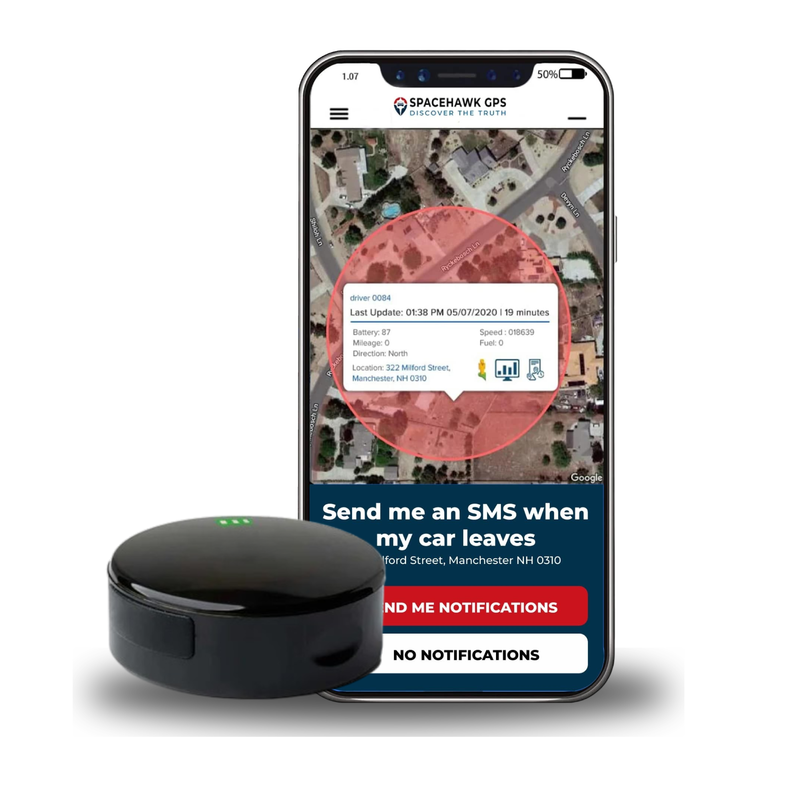
The SpaceHawk GPS tracker is built for people who need real-time tracking, not occasional location updates. Unlike Bluetooth trackers, it uses its own GPS receiver and 4G LTE connection to report location updates as often as every 3 seconds on the fastest plan, with accuracy down to about 6 feet in clear conditions.
I ranked it #7 because it serves a completely different purpose than every other tracker in this guide.
While Bluetooth trackers help locate lost items, SpaceHawk is designed to monitor vehicles, trailers, motorcycles, and valuable assets in real time. This tracker is best suited for people who want theft protection, location history, geofencing alerts, and live GPS tracking for vehicles or equipment. Hardware costs $39.95 on our website, plus the monthly data plan required for cellular GPS service.
Key Features of the SpaceHawk Mini
- Updates as often as every 3 seconds on the fastest plan, for near real-time tracking and theft recovery.
- ~6-foot accuracy in clear outdoor conditions.
- Nationwide coverage anywhere with cellular service and no nearby phones required.
- Custom geofences that trigger alerts when vehicles or assets leave designated areas.
- Complete location history with routes, stops, and speed data.
- Police reporting mode for sharing live tracking during recovery situations.
- IP67 rated waterproof magnetic housing for discreet and secure installation.
- Optional hardwire kit for continuous power on daily-driven vehicles.
- iPhone, Android, and desktop apps for tracking from any device.
Pros & Cons of the SpaceHawk Mini
- Real-time GPS tracking continues working where Bluetooth trackers stop.
- Location updates as fast as 3 seconds provide near-live visibility during movement.
- Geofencing and movement alerts help monitor vehicles automatically.
- Hidden magnetic mounting allows discreet placement on vehicles and equipment.
- Long battery life with an optional hardwire solution for continuous operation.
- Cross-platform support works with both iPhone and Android devices.
- Monthly subscription required for cellular GPS tracking service.
- Higher long-term cost than Bluetooth trackers due to service fees.
My longest-running test tells the story. I mounted a SpaceHawk under a trailer parked at a rural storage yard, the same location where a SmartTag 2 sometimes went hours or even a full day without an update.
The SpaceHawk continued reporting on schedule because it never depended on nearby phones to relay its location. That same storage-lot problem is exactly what our trailer GPS tracker setup is built to solve.
I also ran a side-by-side test using both an AirTag and a SpaceHawk in the same vehicle. The AirTag delivered a few early location updates before relying on passing devices for additional reports. The SpaceHawk streamed the entire route in real time, providing continuous location data from departure to destination.
That difference explains why GPS trackers remain the preferred option for vehicles, trailers, motorcycles, and expensive equipment.
If you're protecting something with wheels, an engine, or significant value, SpaceHawk is the tracker I'd choose. For keys, wallets, and everyday items, one of the Bluetooth trackers above will usually make more sense.
Other AirTag Alternatives I Tested
I tested more units than the seven picks above. The trackers below came close and can still work as AirTag alternatives in the right situation, but each one fell short of the main list for a clear reason. I've also added the two questions readers keep asking me about: voice assistant support and Apple's new AirTag.
Cube Shadow and Cube Pro
Cube's two Bluetooth tags ring from the Cube Tracker app up to about 200 feet away. The Shadow is an ultra-thin rechargeable tag for wallets and passports, and the Pro adds an IP67 body with a replaceable battery rated for up to a year.
Both rely on Cube's own small crowd-find community, so out-of-range updates are rare.
eufy SmartTrack Link
A low-cost Apple Find My tag with a replaceable CR2032 battery rated for up to a year, up to 80 m of Bluetooth range and an IPX4 rain rating. Android phones can only use the tag inside the eufy Security app, without a crowd network, so the Ugreen FineTrack stays my budget Find My pick.
Alexa and Siri Integration
Voice finding is handy at home, but no tracker should win on voice alone. Here's what works today:
- Siri plays a sound on AirTag and other Find My tags.
- Tile links to Amazon Alexa and Google Assistant.
- Chipolo works with Alexa and Google Assistant, and Cube offers an Alexa skill.
Next-Generation AirTag (2nd Gen)
Apple's AirTag (2nd generation) arrived in January 2026 with a second-gen UWB chip, Precision Finding from up to 50 percent farther away and a louder speaker, still at $29. Setup still needs an iPhone or iPad, and there's no live tracking, so the picks above remain the answer for Android users and anything that needs real-time GPS.
The SpaceHawk vs AirTag test in pick #7 raises the exact question I get asked most, so it deserves its own section.
Apple AirTag vs GPS Tracker: Which One Do You Actually Need?
An Apple AirTag is designed to find lost items, while a GPS tracker is designed to track moving vehicles and assets in real time.
The biggest difference is how they report location. AirTags depend on nearby Apple devices to update their location through the Find My network. GPS trackers calculate their own location using satellites and send updates through a cellular connection.

Here's a quick side-by-side comparison:
AirTag / Bluetooth Tags vs Real-Time GPS Tracker
| Factor | AirTag / Bluetooth Tags | Real-Time GPS Tracker |
|---|---|---|
| Location source | Nearby phones relay it | Own GPS receiver + 4G LTE |
| Real-time updates | No, only when a phone passes nearby | Yes, as often as every 3 seconds on the fastest plan |
| Works with no phones around | No | Yes |
| Anti-stalking alerts | Yes, alerts a person an unknown tag travels with | Built for vehicles and assets you own, reports only to the account owner |
| Geofencing | No | Yes |
| Location history | Last-seen locations | Full routes, stops, and speed |
| Subscription | Usually none | Required |
| Battery | ~1-2 years (CR2032) | 1-3 weeks active or hardwired |
| Best for | Keys, wallets, luggage | Cars, trailers, equipment |
Why Do AirTags Fail as Car Trackers?
AirTags struggle as car trackers because they rely on nearby phones, reveal their presence, and lack vehicle-focused tracking features.
The biggest limitations are:
- Location updates depend on nearby Apple devices, which can lead to delayed or missing reports in areas with fewer phones.
- Anti-stalking protections may alert a thief that a tracker is traveling with the vehicle, reducing its effectiveness for theft recovery.
- Audible safety notifications can expose the tracker's location and give someone the opportunity to remove it.
- No geofencing capabilities for receiving instant alerts when a vehicle starts moving or leaves a predefined boundary.
- No real-time tracking, location history, or speed data for monitoring where a vehicle has traveled.
I've used Bluetooth trackers in rural areas and low-traffic locations, and the same pattern appears every time. Once nearby phones disappear, updates become less frequent or stop altogether.
Apple built these protections intentionally to prevent unwanted tracking. They're important privacy features, but they also make AirTags a poor choice for vehicle theft recovery. But GPS tracker works differently.
Before you mount anything, keep one rule in mind. Only track vehicles and assets you own or have permission to track, because tracking another person's car without consent is illegal in many states. Our GPS tracking laws guide breaks down the rules state by state.

What's the Battery Difference Between AirTags and GPS Trackers?
AirTags last longer because they only broadcast a low-power Bluetooth signal. Nearby phones handle the heavy lifting. But GPS trackers use more power because they continuously communicate with satellites and cellular networks.
Here's the practical difference:
- Bluetooth trackers typically run 1-2 years on a CR2032 battery.
- GPS trackers typically run 1-3 weeks during active tracking.
- Motion-activated standby can extend battery life to several months.
- Hardwired GPS trackers can run continuously without charging.
The longer battery life of Bluetooth trackers comes with a trade-off: they can't provide real-time tracking when no phones are nearby.

What Does Real-Time GPS Tracking Cost?
For most people, real-time GPS tracking costs around $20-100+ for the hardware plus a monthly cellular data plan. SpaceHawk plans start at $9.95 per month on a 2-year prepay or $19.95 month to month with 3-minute updates, and faster plans update as often as every 3 seconds. What you're paying for is live GPS location updates, geofencing alerts, route and location history, theft-recovery tracking, and cellular data transmission.
If you're protecting a car, trailer, motorcycle, or expensive equipment, the additional cost of GPS tracking is often easier to justify because you're paying for continuous visibility rather than occasional location sightings.
Compared to that, a GPS tracking subscription is often a relatively small investment for assets you can't afford to lose.
How to Choose the Best AirTag Alternative (Buying Guide)
The best AirTag alternative depends on what you're tracking. For keys, wallets, and luggage, a Bluetooth tracker is usually the best choice. For cars, trailers, and valuable equipment, a real-time GPS tracker is often the better option.
I've found most people make their decision harder than it needs to be. Ask yourself the five questions below, and you'll narrow the field down quickly.
What Are You Actually Tracking?
This is the most important question because it determines the type of tracker you need before you even look at brands or features. Bluetooth trackers are designed for everyday items that tend to get misplaced nearby. GPS trackers are built for vehicles, trailers, motorcycles, equipment, and other assets that can travel far from you.
A quick rule of thumb:
- Keys, wallets, backpacks, and remotes need a Bluetooth tracker.
- Luggage and travel bags require a crowd-network tracker.
- Cars, trailers, motorcycles, and equipment tracking need a real-time GPS tracker.
Start with the item you're protecting, and the right category usually becomes obvious.
Which Phone Ecosystem Are You Using?

Your phone plays a bigger role and determines which tracking networks and features are available to you. iPhone users benefit from Apple's Find My network, while Android users typically rely on Google Find Hub or Samsung SmartThings Find.
These networks power everything from location updates and lost-item recovery to features like Precision Finding and left-behind alerts. Before looking at specific trackers, start by identifying which ecosystem you'll be using most often. That alone can eliminate several options and make the decision much easier.
Here's the quick breakdown:
- iPhone: AirTag, Ugreen FineTrack, Chipolo Pop, or Pebblebee on the Find My network.
- Samsung Galaxy: SmartTag 2 is the strongest option in the Galaxy ecosystem.
- Other Android phones: Moto Tag or Chipolo Pop on Google Find Hub.
- Mixed-device households: Tile Pro's shared cross-platform app, or dual-network trackers like Chipolo Pop and Pebblebee.
- Any smartphone: SpaceHawk works independently through its own GPS and cellular connection.
Apple's Find My network remains the largest in the U.S., Google's Find Hub network continues to grow rapidly, and Samsung's SmartThings Find performs especially well for Galaxy users. The best tracker network is usually the one your household already uses every day.
How Much Battery Maintenance Are You Comfortable With?
Battery life determines how often you'll need to recharge, replace batteries, or maintain the tracker after you buy it. Most Bluetooth trackers use replaceable CR2032 batteries that last one to two years, while rechargeable models trade battery replacements for occasional charging. GPS trackers use more power because they continuously communicate with satellites and cellular networks, so they typically require more frequent charging unless hardwired.
When comparing trackers, don't just look for the longest battery life. Look for the battery type and maintenance routine that best fits how you'll actually use the tracker.
Do You Need Real-Time Tracking or Just Item Finding?

This question determines whether you need a Bluetooth tracker or a GPS tracker. Bluetooth trackers are designed to help you find misplaced items like keys, wallets, bags, and other everyday belongings. But if you're trying to monitor a vehicle, trailer, motorcycle, or valuable asset, real-time GPS tracking is often the better choice.
The key difference is simple, Bluetooth trackers show where an item was last detected, while GPS trackers show where it is right now.
A good rule of thumb is, if a "last seen" location is enough, a Bluetooth tracker will probably do the job. If you need live location updates, theft recovery, or continuous monitoring, look for a real-time GPS tracker.
What Costs Extra After You Buy?
The purchase price is only part of the story, because most Bluetooth trackers on this list are a one-time purchase with no required monthly fees. SmartTag 2, Chipolo Pop, Moto Tag, Pebblebee, and Ugreen FineTrack all fall into that category.
There are a few exceptions worth noting:
- Tile Premium adds optional features such as location history.
- GPS trackers require a monthly subscription for cellular data.
- Some trackers may need replacement batteries or accessories over time.
Before you buy, look at the total ownership cost over a year rather than focusing only on the sticker price. A tracker that costs a little more upfront can sometimes save money if it avoids subscription fees, while a GPS tracker can easily justify its monthly cost when you're protecting a vehicle or valuable asset.
The right tracker isn't necessarily the cheapest one but the one that reliably does the job you need it to do.

Conclusion: Which AirTag Alternative Should You Buy?
If you've made it this far, the decision is probably simpler than it looked at the start.
The best AirTag alternative depends on what you're tracking and the phone you use. If you're a Samsung Galaxy user, the SmartTag 2 offers the closest experience to an AirTag. If you want flexibility between Apple and Android, the Chipolo Pop is hard to beat. For mixed-device households, the Tile Pro remains one of the easiest options to recommend.
If rechargeable batteries are needed, look at the Pebblebee Clip 5. Android users outside the Samsung ecosystem should consider the Moto Tag, while budget-conscious iPhone users will get excellent value from the Ugreen FineTrack.
For vehicles, trailers, motorcycles, and valuable equipment the SpaceHawk mini-GPS tracker is my top recommendation for vehicle and asset protection. SpaceHawk delivers real-time GPS tracking, location history, geofence alerts, and live updates without depending on nearby iPhones or Android devices.
Choose the tracker that fits the job. A Bluetooth tracker is usually enough for keys, wallets, bags, and everyday items. If you're protecting something with wheels or significant value, a real-time GPS tracker is often the smarter investment.
Ready to Track Vehicles, Trailers, or Equipment in Real Time?
SpaceHawk provides live GPS updates, geofence alerts, location history, and discreet tracking in over 150 countries. Bluetooth trackers wait for nearby phones. SpaceHawk doesn't.
★★★★★4.6 / 5 · 100,000+ happy customers
- Works on Android & iPhone
- Real-Time GPS, Not Bluetooth
- Updates as Fast as 3 Sec
- 150+ Countries Coverage
- Hidden Magnetic Mount
- ~6 Feet Accuracy







 Buy on Amazon