Key Takeaways
-
01
GPS trackers for autistic children help parents locate a child immediately during wandering episodes.
-
02
AngelSense GPS is built specifically for autistic children providing fast wandering alerts.
-
03
Real-time GPS with geofencing is essential for autistic children prone to unexpected wandering.
-
04
Sensory comfort and tamper resistance come first when choosing GPS trackers for autistic children.
-
05
GPS watch trackers like Xplora combine location tracking with two-way calling for daily routines.
5 Best GPS Trackers for Autistic Children: What Actually Helps in Real Life
A GPS tracker for autistic children helps parents and caregivers monitor a child’s location in real time, especially when wandering, sensory overload, or unexpected route changes are a concern.
I’ve spent over 15 years working with GPS tracking devices, and one thing is consistent, the right device makes it easier to respond quickly if a child leaves a safe area, without hovering or limiting independence. The problem is simple. Many tracking devices promise accurate realtime location monitoring, but fall apart with delayed alerts, weak signals, or confusing apps.
On a personal note, when I was in my early 20s I spent more than five years in ABA as a teacher for nonverbal autistic kids. My first two students were Giselle, a 6-year-old girl who was limited to about 20 ASL signs. And Parker, a 5-year-old boy who would be stimming most days as he rewinded his favorite parts of Thomas the Tank engine over and over and over again. And yes, they both liked to impulse run. So I know how fast a child can slip out a door, and I know the feeling a parent gets in that first minute.
That’s stressful when you’re trying to protect a child with autism while still giving them room to grow. Or even if they are walking around the neighborhood or on an outing with a therapist.
In this guide, I break down the GPS tracking devices that work best for children with autism, based on accurate tracking, safety alerts, SOS features, battery performance, and tracker costs. If you’re trying to avoid buying a tracker that fails when it is needed in daily routines, this comparison will save you time and frustration.
I’ll walk you through which devices are built for kids, which ones fall short, and how to choose a personal GPS tracker that actually supports your child’s safety without adding stress.
Why GPS Tracking Is Part of Safety Planning for Autistic Children

GPS tracking belongs in safety planning for autistic children because wandering is common, and a child who slips away can reach danger within minutes. A tracker gives you a live location to hand police before that clock runs out.
Four numbers from the CDC, the journal Pediatrics and NCMEC show how real that risk is for families.
NCMEC reports that drowning most often happens within a half mile of where a child went missing, and within a few minutes.
That brings practical safety considerations, especially when wandering or unexpected movement is part of daily routines. Autistic child tracking is about having a reliable way to locate a child quickly if they leave a safe area or don’t follow a familiar route. This perspective shaped how I evaluated each device.
The 5 Picks at a Glance
| Tracker | AngelSense#1 Pick | PAJ Easy Finder 4G#2 Pick | Xplora XGO 2#3 Pick | Garmin Bounce 2#4 Pick | Apple AirTag#5 Pick |
|---|---|---|---|---|---|
| Best for | Kids who bolt, nonspeaking kids | Long battery, fewer charges | Kids happy to wear a watch | Older kids ready to call | Backpack backup only |
| Location | Live GPS, cellular | Live GPS, 4G | GPS, Wi-Fi, cellular | Live GPS, LTE | Bluetooth only, no GPS |
| Two-way voice | Yes | Voice messages | Yes, approved contacts | Yes | No |
| SOS button | Yes | Yes | Yes | Yes (Assistance) | No |
| How it’s worn | Locking sleeve or watch | Pocket or bag | Wrist | Wrist | Needs a holder |
| Battery | Charge daily | About 10 days at 1 hr a day | Charge daily | Up to 2 days | About 1 year |
| Monthly plan | $49.99/mo | From $5.50/mo | $12/mo | $9.99/mo | None |
| Buy | Amazon | Amazon | Amazon | Amazon | Amazon |
How I Picked These GPS Trackers for Autistic Children
I didn’t put this list together by copying brand claims. Every GPS tracker in this guide was purchased directly by us at SpaceHawk and tested by me, Ryan, using the same criteria parents care about in real life. None of the devices were provided by brands.
There was no sponsorship and no promotional influence. We bought them, used them, and evaluated them the way a caregiver would.

To narrow dozens of personal GPS trackers down to these five, I focused on how each device behaved during everyday situations like school hours, outings, and routine transitions. Here’s what I observed during testing:
-
1
Location accuracy and update reliability Especially how often realtime GPS tracking refreshed and whether location updates lagged when movement happened quickly.
-
2
Alert behavior Including how fast geofencing alerts arrived when a child left a set area and whether notifications were clear or easy to miss.
-
3
Usability for families Looking at app design, location sharing clarity, and how quickly you could check a child’s location.
-
4
Battery performance in daily use How long devices lasted with live tracking enabled.
-
5
Comfort and wearability Including whether the tracker stayed on and how children reacted to wearing it over a full day.
-
6
Safety features that actually helped Such as SOS buttons, emergency alerts, and two-way communication when available.
-
7
Ongoing costs Reviewing monthly subscription pricing and what features were included versus locked behind higher plans.
Only trackers that performed consistently across these areas made the final list. Some popular devices were removed because alerts were slow, tracking felt unreliable, or the setup added unnecessary friction. The goal here was not to crown a single “best” device.
This testing gives you a short list of GPS trackers that are held up in real use, so you can choose the one that fits your child’s needs and your daily routine with confidence.
With that approach in place, one tracker consistently rose to the top during testing. Let’s start with the one designed around the safety needs of autistic children rather than generic tracking use.
1. AngelSense GPS: Best For Safety Alerts For Autistic Children

AngelSense GPS is a personal GPS tracker designed specifically for autistic children and others who are at risk of wandering. AngelSense earns the #1 spot because it combines accurate realtime GPS tracking, smart safety alerts, and two-way communication in a system that’s built around real caregiving scenarios.
What I like most is how focused it is on safety behavior. This isn’t a general tracker adapted for kids.
AngelSense GPS is designed for situations where a child leaves a safe area, misses a routine stop, or needs help fast. That focus is why it consistently performs better than generic GPS devices and Bluetooth trackers.
What it costs. $49.99 a month on a 1-year contract, with a 30-day money-back guarantee.
Key Features of AngelSense GPS
- All-Day Real-Time Tracking: Continuous GPS monitoring gives you peace of mind.
- Assistive Speakerphone: This offers two-way communication, including an SOS mode for emergencies.
- Intelligent iAlerts: These alert you to unusual activities, like early departures or late arrivals.
- Safe Ride Monitoring: Track the bus ride to school, with updates on delays or unexpected stops.
- Emergency Search Tools: Perfect for activating a search team, with a live map and alarm function.
- Monthly Subscription: At $49.99 per month, the service includes unlimited tracking, 60 voice minutes, and premium safety features.
- Risk-Free: This GPS device comes with a 30-day money-back guarantee, letting you try risk-free.
- Sensory Friendly Accessories: The package includes a sensory-sensitive wearing sleeve, ensuring comfort for your child.
Pros & Cons of AngelSense GPS
- Fast Charging: Recharges completely in 110 minutes.
- Strong magnetic pins ensure secure attachment to clothing.
- Includes 60 minutes of prepaid voice calls.
- Runner mode updates location every 10 seconds.
- Compact dimensions (2.4 x 1.7 x 0.6 inches) for easy placement.
- Not Fully Waterproof: Requires additional pouch for swimming.
- Monthly Plan Expensive: $49.99 a month on a 1-year contract.
- Weighs 1.4 ounces, heavier than similar devices.
- Return Policy Restrictions: Incur costs if not returned in original packaging.
What Parents Say About AngelSense GPS
I've been using Angelsense 2019, and it has really opened up so many possibilities for my family. My son has asthma and wears it all the time. I love it so much that I purchased a second one for my younger son so that when we are out and about, I know where they are at all times. I am more comfortable using angelsense when we go places; I can't live without it now.
I ordered this about a week ago for myself. The battery takes forever to fully charge; after a full day of charging, it only got to 75%. Took it out with my child for around 3-4 hours. My child is in school for approximately 7 hours a day on weekdays. Contact customer support. The only solution he offered was a return. When I said I needed to use it for my child, Still, he just went ahead and created a return.
Read a real customer experience with this GPS product on Reddit
I’ve used AngelSense in everyday situations where timing counts like school mornings, transit routes, and crowded public places. The realtime location updates refresh often enough that you’re not guessing or waiting. You open the app and see where your child is, right then.
One thing you’ll notice right away is how detailed the geofencing alerts are. When a child leaves a safe area, the notification comes through clearly and quickly, without confusion or delay. That alone removes a lot of stress.
And what really sets it apart is the SOS button and two-way communication. Being able to talk to your child or briefly understand their surroundings, adds a layer of safety that most GPS tracking devices simply don’t offer. Battery life is shorter than some trackers, so daily charging is part of the routine.
For a device that prioritizes accurate real-time tracking, that trade-off makes sense. If your child needs consistent monitoring and fast alerts, AngelSense is one of the most reliable GPS trackers for kids I’ve tested.
 |
|
||||||||
 View on Amazon
 2. PAJ GPS Easy Finder: Best For Long Battery Life

PAJ GPS Easy Finder is a personal GPS tracking device that prioritizes long-lasting battery life and straightforward live tracking. PAJ GPS Easy Finder offers reliable GPS tracking with fewer charging demands, making it practical for families who don’t want to manage daily charging.
Easy Finder is not designed exclusively for autistic children, but it works well in situations where location monitoring and battery endurance matter more than constant interaction.
Finally, the PAJ GPS Easy Finder runs about 10 days at 1 hour of tracking a day, and 14 days in standby mode. In fact, some parents who reviewed this autism safety product, had nothing but good things to say about it!
What it costs. $39.99 for the device, plus plans from $5.50 a month.
Key Features of PAJ GPS Easy Finder
- Flexible Subscription: Choose a subscription that fits your needs, and cancel risk-free within the first 30 days.
- Real-Time Alerts: Set alarms for defined areas and get instant notifications for any suspicious activity.
- Panic SOS Button: In case of emergencies, your child can trigger an alarm notifying you immediately.
- Detailed Route Information: Track your child’s locations with precise route details.
- Price: Various subscription plans are available starting at $5.50/month. No hidden fees or long-term commitments.
- Battery Life: About 10 days of active tracking (1 hour per day) with a 3,000mAh battery, reducing the need for frequent recharging.
- Internet Safety: Rest assured knowing that your child’s tracking information remains secure and private.
- Small and Lightweight: It fits into almost any pocket, which means it’s easy for your child to carry around.
- IP65 Rated: Sealed against dust and water splashes, at about 100 g.
Pros & Cons of PAJ GPS Easy Finder
- Battery Life: 10 days with 1 hour active tracking daily.
- SOS Button For Emergencies: Quick alert system for immediate response.
- Real Time GPS Tracking
- Affordable Tracking Options: Cost-effective plans starting at $5.50/month.
- No Direct Communication Feature: Cannot speak to child through device.
- Not Specifically Designed For Children's Wear: Requires secure attachment methods.
- Subscription Required: Ongoing costs for continued service.
What Parents Say About PAJ GPS Easy Finder
I bought this GPS to keep track of my motorcycle. I have been testing it out in my SUV since I received it. I charged it the first day and have left it in my vehicle every day. It sits on my console. The battery charge still says 59% after 14 days of use. It sends notifications within seconds of moving. Accuracy is pretty good, but I have noticed it has a slight lag in tracking. Otherwise, it works fantastically. For $7.00 a month plus the initial cost, it is by far the best GPS for the money.
I decided to purchase a GPS and I was confirmed that it would work in my country it did not work at all, was told that a solution would be provided but I did not receive a response.
Battery anxiety is the first thing most parents mention when we talk about GPS tracking devices. But the PAJ GPS Easy Finder immediately feels different. In day-to-day use the longlasting battery holds up well. With moderate live tracking enabled, it runs for days rather than hours. That makes it easier to rely on consistently, especially if charging schedules tend to slip.
Location monitoring is steady rather than aggressive. You get accurate GPS tracking and usable location history, but updates don’t fire as rapidly as child-specific trackers. Geofencing alerts still work as expected when a child leaves a defined area, and notifications come through cleanly.
There is an SOS button, which adds basic emergency coverage. What’s missing is two-way communication. You can’t call or talk through the device, so it’s better suited to predictable routes than high-risk wandering situations.
PAJ GPS works best when reliability and battery life matter more than constant interaction. For families who want dependable GPS tracking without daily charging pressure, it fits that role well.
3. Xplora XGO 2: Best GPS Watch with Calling for Kids

Xplora XGO 2 is a GPS-enabled smartwatch designed for kids, combining location tracking with basic calling and messaging. XGO 2 works well for children who are ready for a wearable device and benefit from children GPS tracking plus simple communication, all without full smartphone access.
This is less about constant location monitoring and more about giving a child controlled independence, with safety features built in.
Xplora now sells the XGO3 as the successor in the US, on a $12/month plan.
What it costs. Xplora’s plan runs $12 a month or $120 a year, with no contract.
Key Features of Xplora XGO 2
- Voice Calls & Messages: Your child can make and receive calls, send and receive texts, emojis, images, and voice messages to pre-saved numbers.
- SOS Function: Empower your child in emergencies by pressing the SOS button to notify you and other emergency contacts of their location.
- GPS & Safety Zones: Monitor your child’s location with the help of GPS. You can also set up Safety Zones around home, school, or other important places.
- WiFi & Network Compatibility: The XGO 2 comes with a pre-installed Xplora Connect SIM card, ensuring smooth connectivity.
- Price: Xplora’s plan runs $12 per month or $120 per year, with no contract.
- Automated Security System: Designed for internet safety and child safety, with SOS alerts and predefined Safety Zones.
- Fitness Tracker: Encourages a balance between screen time and physical activity for your child.
- Track Record: Trusted by over 400,000 customers worldwide for child safety.
Pros & Cons of Xplora XGO 2
- Voice Call Capability: Make/receive calls from pre-saved numbers.
- SOS Button For Emergencies: Instantly notifies contacts with location.
- GPS & Safety Zones: Tracks child's location with key location alerts.
- Parental Control Features: Full control and visibility via parent app.
- Limited Messaging Capability: Can't send standard text messages.
- Risk of Distraction: Non-educational features may distract children.
- Requires responsible use of calling and messaging features.
- Subscription Required: $12 a month for Xplora’s plan.
What Parents Say About Xplora XGO 2
My son has been asking for a phone for awhile now, and we have been reluctant to get him one since he is only 7. This smartwatch was the perfect and safe way to introduce him to the digital world. It's a phone with GPS, and it even has a step counter. I love that it encourages physical activity. He loves that he can make phone calls and text by himself (only to the approved contacts that I set up). He has full use of all features that I set up and am able to control in the parent app. It doesn't have internet capability, so I don't have to worry about anything, and you can also set up safety zones that will send you an alert when the child goes out of the safety zones that I set up. This smartwatch has been a great addition. I totally recommend it.
The watch doesn't have a single reliable function. The GPS either doesn't work or will give you a 4-city block blob. Calls will either not go through or drop suddenly, and it's not a one-off issue. I have two phones that both have the same problems.
Watch a YouTube video review by ReadySitGeek on this GPS tracker for autism
Some kids simply won’t tolerate a clip-on or pouch-style tracker. In those cases, a watch changes the equation. The XGO 2 stays on the wrist, which makes it easier to keep track of throughout the day. You can check your child’s location, view recent location history, and set geofencing alerts around places like home or school.
Updates were not as frequent as dedicated personal GPS devices, but they’re consistent enough for routine monitoring.
Calling was limited to pre-approved contacts, which keeps things simple and controlled. The SOS button was easy to press and sends an alert with the child’s realtime location, which adds reassurance during outings or transitions.
Battery life usually means daily charging, especially if GPS and calling are used regularly. That’s typical for GPS watches. One thing to keep in mind: for some autistic children, the watch itself can become a distraction. Whether that’s a pro or a con depends on the child.
Xplora XGO 2 fits best when a child is comfortable wearing a watch and benefits from light communication alongside location monitoring.
4. Garmin Bounce 2: Best GPS Watch for Older Kids Ready to Call

Garmin Bounce 2 is an LTE kids smartwatch with real-time GPS location, two-way calling, and text and voice messages. Your child can only reach the contacts you approve in the Garmin Jr. app.
Geofence alerts tell you when your child leaves a place you set. The Assistance feature sends your child’s live location and places a call to family contacts, and the 5 ATM rating makes the watch swim-friendly.
Garmin built the Bounce 2 for kids who can handle a watch and a phone-style routine. For a child who pulls things off the wrist, the price makes it a risky first try.
What it costs. $299.99 for the watch, plus $9.99 a month for the LTE plan.
Key Features of Garmin Bounce 2
- Two-Way Calling: Calls go to and from the contacts you approve in the Garmin Jr. app.
- Text and Voice Messages: Your child can send short texts and voice notes to approved contacts.
- Real-Time Location: See your child on the map over LTE, with no phone needed nearby.
- Geofence Alerts: Get a notification when your child leaves or arrives at a place you set.
- Assistance Feature: Sends your child’s live location and calls family contacts.
- Swim-Friendly: Rated 5 ATM, so pool days and rainy walks are fine.
- Battery Life: Up to 2 days between charges.
Pros & Cons of Garmin Bounce 2
- Calls and messages go to approved contacts only.
- Real-time LTE location with no phone nearby.
- Assistance feature shares live location and calls family.
- Swim-friendly 5 ATM build.
- Up to 2 days of battery.
- $299.99 is the highest device price in this guide.
- A $9.99 monthly LTE plan is required.
- A child who pulls off watches can remove it.
- Amazon reviews are mixed, at 3.2 stars.
What Parents Say About Garmin Bounce 2
Fantastic! Allows us to monitor our grandson's location as well as send and receive messages and calls. Very impressive!
I love Garmin watches, I own a few. I got this for my son to try to avoid getting him a smart phone so he could keep in touch. The communication functions on this device are horrible. Texts are delayed if you even get them at all , phone calls barley work.
I set up the Garmin Bounce 2 in the Garmin Jr. app from my phone, and adding approved contacts took a few minutes. The watch only calls or texts those people, which I liked right away.
Calling was my favorite part. A kid taps a name and talks, with no phone in the backpack and no app to open.
I wore it on errands around Murrieta, and location showed up on the map over LTE without a phone nearby. Geofence alerts came through when the watch left a set area. For a routine check-in the updates were steady, but a calling watch does not refresh like a tracker built for a child who bolts.
Battery lined up with Garmin’s rating of up to 2 days. With calling and location running, I still charged it every night, same as the Xplora.
Pick the Garmin Bounce 2 if your child is older, likes wearing a watch and is ready to call you. For a child who bolts without warning, start with AngelSense.
5. Apple AirTag: Budget Backup, Not a Child Tracker

Apple AirTag is a Bluetooth-based location tracker, not a full GPS device. AirTag ranks #5 because it offers simple, affordable location sharing that works well in limited scenarios and especially for families already using iPhones.
Apple AirTag is not designed specifically for autistic children, but for some households, it fills a narrow gap when budget and simplicity matter more than advanced safety features.
Apple states that AirTag and other Find My accessories should not be used to track people.
What it costs. $29 for one AirTag or $99 for a four-pack, with no monthly plan.
Key Features of Apple AirTag
- Easy Pairing: With an iPhone, tracking becomes a breeze due to Apple’s ecosystem integration.
- Precision Finding: The AirTag gives you the current location of your child through the ‘Find My’ app.
- User-Friendly: It is straightforward and simple to use, making it accessible to everyone.
- Sleek Design: The AirTag is small, lightweight, and sensory-friendly.
- Price: More affordable than specialized autism GPS devices, but with limited features.
- Battery Life: The AirTag has a user-replaceable battery that lasts over a year.
- Internet Safety: The tracking information is encrypted and anonymous to maintain privacy.
- Apple Ecosystem: Works best within the Apple ecosystem, which can be a limitation for non-Apple users.
Pros & Cons of Apple AirTag
- Lost Mode Alerts: Notifies parents if child is found by network.
- Durable Battery Life: Over a year's use without needing replacement.
- Fantastic Customer Support
- Over 11,000 Amazon ratings.
- Family Sharing For Monitoring: Allows multiple caregivers to track the child.
- Additional Costs For Accessories: Essential for attaching to clothing or belongings
- Easy To Misplace: AirTag itself could be lost by a child.
- No Direct Communication Feature: Can't speak to child through AirTag.
- Not Specifically Child-Wear Friendly: Needs creative methods for secure attachment.
What Parents Say About Apple AirTag
The Apple Air Tag is a super gadget. Easy to use and set up. We just purchased this additional device for protection in my wife's car. The number of car thefts has increased in my area, and it is better to be safe than sorry. There is no extra monthly cost. Let’s see if it does the job.
This is taking forever for my refund. 14 days is unacceptable when you have proof I dropped it off at a UPS store and you have my credit card information to recharge me if it is not in acceptable condition. Also, I was under the impression that it would work with an app on my Android phone. It does not work with Android, and this is not stated anywhere! If I don't get my refund, I will really blast the Apple Company for their poor customer service. This is a horrible way to be treated!
 AirTag Unboxing
 In Hand, Real Testing
I’ve used AirTags mainly to understand their limits for child safety. Setup is easy. If you’re already in the Apple ecosystem, pairing takes seconds and the Find My app feels familiar right away.
Location updates depend heavily on nearby Apple devices. In busy areas, updates can feel surprisingly accurate. In quieter neighborhoods or indoors, there can be noticeable gaps. That’s the trade-off with Bluetooth locator tracking versus true realtime GPS tracking.
There’s no SOS button, no two-way communication, and no automated security alerts if a child leaves a location. For a child with autism who may wander unexpectedly, that’s important to understand upfront. Battery life is excellent. I’ve seen AirTags run close to a year on a replaceable battery, which removes daily charging from your routine entirely.
AirTag works best as a supplemental tracker, not a primary safety device. Airtag is useful for basic location checks, backpacks, or short outings but it’s not built for high-risk wandering scenarios.
Check out Marques Brownlee’s detailed YouTube review which has over 9.2 million views
 |
|
||||||||
If Your Child Goes Missing, Do This First
A tracker only helps if everyone knows what to do the moment a child is gone. Share these steps with every caregiver.
-
1
Call 911 right away. Tell the dispatcher your child is autistic, whether your child speaks, and whether your child is drawn to water.
-
2
Search water first. Check pools, ponds, creeks and drainage ditches nearby before anywhere else.
-
3
Open your tracker app and share the live location with police.
-
4
Call the National Center for Missing & Exploited Children at 1-800-843-5678. The line runs 24 hours.
-
5
Prepare today. Fill out NCMEC’s 911 script and send its letter to your neighbors before you ever need them. The National Autism Association’s Big Red Safety Box has free tools for this too, when in stock.
A nonspeaking child may not answer when searchers call their name, and may hide from loud voices or sirens. Tell responders this when you call.
Source: NCMEC
Buying Guide: How to Choose the Right GPS Tracker for an Autistic Child
Choosing a GPS tracker for an autistic child comes down to fit. The device needs to align with how your child moves through daily routines and how quickly you need to respond when something feels off.
I’ll walk you through the key decisions step by step, so you can narrow this down without overthinking it.
1. Start With Wandering Risk
Start by thinking about wandering, because this one factor shapes everything else. If your child has ever left a safe area unexpectedly, realtime GPS tracking with fast alerts becomes essential.

You need location updates that refresh often and notifications that trigger the moment a boundary is crossed, not five minutes later.
GPS trackers built for autistic children usually handle this better because they’re designed around wandering behavior. Alerts are clearer, and tracking stays more consistent when movement happens suddenly. If wandering is rare and routes are predictable, a simpler tracker can still work.
In that case, constant high-frequency tracking may be more than you actually need. The goal is to match the tracker to real-world risk, not to buy features you’ll never use.
2. Decide How Much Interaction You Need
Location tracking tells you where your child is. Interaction features help you respond when a situation starts to feel stressful or confusing for them. The right level depends on how your child handles communication at the moment.
Before choosing a device, pause and think through these two questions:
Would talking to my child help in stressful moments?
Would hearing what’s happening around them be useful?
If the answer is yes, look for a tracker that supports two-way communication, an easy-to-use SOS button, and clear emergency alerts. These features can help calm a situation quickly or give you context when something feels off.
If your child finds voices, buttons, or alerts overwhelming, a quieter device often works better. In those cases, reliable location monitoring without interaction can be the more supportive choice.
3. Balance Battery Life With Tracking Accuracy
Battery life and tracking accuracy pull in opposite directions, and this is where many families get stuck. Devices that deliver accurate realtime GPS tracking tend to check in more often, which usually means daily charging. Trackers built for endurance conserve power by updating less frequently.

If fast location refreshes are your priority, compare the best real-time GPS trackers to see which devices provide frequent updates without sacrificing too much battery life.
A few questions help clarify which side matters more for you:
How often do I actually check my child’s location during the day?
Do I need immediate alerts when movement happens, or are periodic updates enough?
Will daily charging fit naturally into our routine, or become a constant hassle?
Am I more concerned about missed updates or about the device running out of power?
If you rely on frequent location checks and fast alerts, daily charging is part of the deal. If you prefer fewer charging headaches and can live with slower updates, a long-lasting battery often makes more sense. Neither option is wrong but the better choice is the one that stays reliable in your day-to-day routine.
4. Think About How the Tracker Is Worn
How a tracker is worn plays a bigger role than most spec sheets suggest. A device only helps if your child actually keeps it on.

Some children are comfortable wearing a watch all day. Others do better with a small tracker clipped to clothing or placed inside a backpack. And some won’t tolerate any wearable option. Comfort and sensory sensitivity influence whether a tracker stays in place. If a device feels bulky, itchy, or distracting, it usually gets removed.
From what I’ve seen, simpler designs tend to work better for children who react strongly to textures or pressure.
If wearability and comfort are a concern, GPS child tracking jewelry can be another option worth exploring, especially for kids who don’t tolerate watches or clip-on devices.
The safest tracker is the one your child keeps with them consistently. If a “better” device comes off halfway through the day, it stops helping. When choosing between features and wearability, routine and comfort usually lead to better results.
For children who won’t tolerate a watch or clip-on device, GPS trackers for kids' shoes can offer another discreet way to keep location tracking with them throughout the day.
How to Help Your Child Keep a Tracker On
For many kids on the spectrum, the hard part is the first few minutes of wearing something new. Start small. Put the device on for a minute or two during something your child loves, then take it off before they ask. Add a little more time each day, and keep the placement the same so the feeling becomes predictable. Praise calm wearing right away. If your child works with a BCBA or an occupational therapist, ask them to build wearing the tracker into goals they already run.
5. Understand Ongoing Costs Upfront
Most GPS tracking devices don’t stop costing money after the initial purchase. Ongoing fees affect how usable a tracker feels over time, so it’s worth understanding the full picture before committing.
When comparing options, focus on a few cost details that tend to cause confusion later:
Monthly versus yearly plans
Some trackers look cheaper monthly but lock you into longer commitments. Others offer discounts for annual plans, which can save money if you’re confident the device fits your routine.
What the subscription actually includes
Not all plans cover the same features. Check whether safety alerts, location history, SOS mode, and automated security features are included or reserved for higher tiers.
How easy it is to cancel or switch plans
Life changes. A tracker that’s simple to pause, downgrade, or cancel gives you more flexibility if your child’s needs change.
The real long-term cost
A low upfront price can be misleading if the monthly subscription adds up quickly over time.

A good rule of thumb is to think beyond the device itself. The best choice is one whose ongoing costs feel reasonable six months from now, not just affordable today.
Not sure how monthly plans differ or which features are included? Here’s a clear guide that breaks down GPS data plans so you can choose with confidence.
Matching a GPS Tracker to Your Child’s Needs: How to Choose the Right Option for Autism Safety
Choose a GPS tracker based on how your child moves through the day. If fast alerts and close monitoring are essential, a child-focused tracker fits best. If simplicity and longer battery life are the priority, a basic personal GPS can work. And if communication helps during transitions, a GPS watch offers a practical middle option.
There isn’t a single best choice for every family. The best tracker is the one that fits your child’s routines and supports how you handle safety day to day.
 |
|
||||||||
Safety That Leaves Room to Grow
A tracker is a safety net, and a safety net is what lets a child practice the bus stop, the park or the grocery aisle with a little more room.
Resilience is often treated like a personality trait. But resilient behavior actually develops through learning histories, environments, and opportunities for behavioral flexibility.

Steve Ward, MA, BCBA, has worked in behavior analysis since 1995 and co-owns Whole Child Consulting, LLC. He consults with teams worldwide on everything from early communication and aggression to vocational skills and college inclusion. He is co-author of The Resilience Ready Classroom: Practical Tools for Helping Students Cope, Try, and Grow.
Final Recommendations for Choosing a GPS Tracker for an Autistic Child
Every child with autism has different safety needs, so the right GPS tracker depends on how closely you need to monitor movement during the day. Some families need constant visibility and fast alerts. Others need something simpler that stays out of the way.
If wandering is a real concern and you want accurate realtime GPS tracking with smart alerts, a child-focused tracker like AngelSense GPS offers the strongest safety coverage.
If you’re mainly looking for basic location sharing at a low cost, and your child follows predictable routines, Apple AirTag can work as a supplemental option, just understand its limits. When battery life and fewer charging headaches matter more than constant updates, PAJ GPS Easy Finder is a practical middle ground.
And if your child benefits from light communication along with tracking, a GPS watch like Xplora XGO 2 may fit better into daily routines.
There’s no perfect device. The best choice is the one that stays with your child, fits your routine, and helps you respond calmly when something feels off.
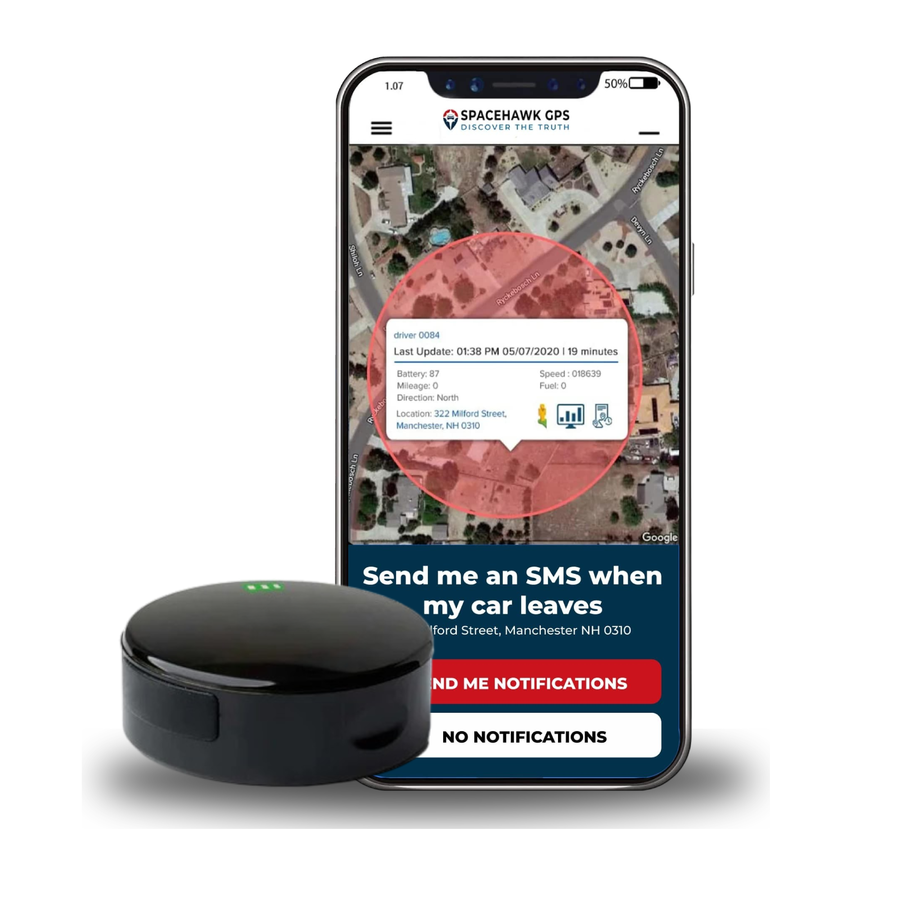
SpaceHawkGPS
Why we suggest this: SpaceHawk is not a tracker for a child to wear, so it is not part of the ranking above. Families use it on the things around a child. Tuck it in the stroller basket to see where the stroller is when a sitter or grandparent takes the baby out, or place it in the car your teen drives for speed alerts, geofence alerts and a full year of trip history.