


-
01
Real-time tracking shows asset location instantly so you can act before problems escalate.
-
02
Proper placement keeps your tracker hidden while maintaining strong and reliable signal accuracy.
-
03
Geofence alerts notify you when an asset leaves its designated safe location boundary.
-
04
Motion tracking extends battery life while still detecting movement the moment it begins.
-
05
Testing your setup ensures alerts work properly before you depend on the system.
As an Amazon Associate, SpaceHawk GPS earns from qualifying purchases.
How to Monitor Asset Movement in Real Time: Step-by-Step Setup Guide (Vehicles, Trailers, and Equipment)
If you're reading this, you need to figure out how to monitor your assets in real time so nothing disappears without you knowing about it. The good news: tracking vehicle movement and equipment location is easier than most people expect, as long as you follow the right steps and set up your alerts properly from the beginning.
I'm Ryan Horban, and I've spent 15+ years working with GPS tracking systems. In that time I've seen just about every tracking mistake that ends with somebody losing expensive equipment.
You'll learn how to choose the right GPS device for your situation, install it without any technical skills, and configure real-time alerts that notify you the moment something moves without permission. By the end, you'll be able to monitor your assets with confidence and catch theft before it becomes a costly problem. Let's start with what you need to know before buying any tracking hardware.
Shipping
Warranty
Support
Packaging
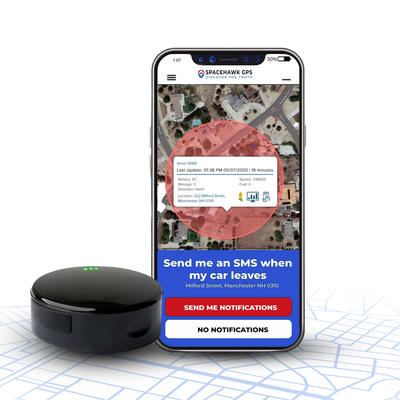
The fastest way to monitor your assets in real time. Attach SpaceHawk under any vehicle, trailer, or piece of equipment in seconds, with no wires and no tools. The moment something moves, you know about it.
- ✓3-second live updates — watch movement as it happens on a live map
- ✓Instant geofence & motion alerts — SMS, push, and email the second it moves
- ✓GNSS accuracy within 6 ft — 155+ countries, 365-day route history
- ✓Ultra-strong magnetic mount — waterproof IP67, 5-minute setup
What Should You Know Before Tracking Assets?
Before you start tracking, a few basics need settling, or you'll end up with a device that doesn't match the assets you're trying to monitor. Get clear on these four points first.

What "real-time" actually means
How live updates behave day to day, and where they differ from a stored report you read hours later.
Which assets to monitor
Vehicles, trailers, job-site equipment, and containers each carry different risk and different mounting needs.
Whether your setup is legally sound
Tracking property you own is straightforward. Anything you don't own changes the rules entirely.
Which hardware type fits
Battery-powered or hardwired, decided by one question: does the asset have constant power?
Skip this planning and you'll end up with a system that looks fine on paper but falls short once your assets are actually moving. A few minutes upfront saves money, time, and a lot of frustration later.
Equipment theft is estimated to cost roughly $1 billion a year across U.S. construction and farm sites, with the National Equipment Register putting the average single incident near $30,000 before you count downtime or project delays. Only about 21 percent of stolen construction equipment is ever recovered.
1. What Is Real-Time Asset Movement Tracking?
Real-time asset movement tracking means you see the exact location of a vehicle, trailer, or piece of equipment as it moves, with live updates reaching your phone within seconds. No delayed reports, no waiting for data to sync. Something moves, you see it immediately on a live map along with its current location and status.
That immediacy is what gives you control. A trailer that starts moving at 2 a.m. triggers an alert while the trailer is still nearby. You open the app, check the location, and you're a step ahead instead of reacting hours later.

There's one distinction worth understanding before going further.
Sends continuous location updates, often every few seconds. You watch movement live, receive motion and geofence alerts, and can respond right away when something looks wrong.
Stores movement data and uploads later, sometimes hours later, sometimes only once the device reconnects. By the time you see it, the asset has already moved and your window to act has closed.
For anything that can be stolen, moved without permission, or needs constant visibility, real-time tracking is the only setup that keeps you in control.
2. Which Assets Should You Actually Track in Real Time?
Almost any physical asset works, provided you can securely attach a GPS tracker to it. In practice, though, tracking tends to concentrate in a handful of high-value or high-risk categories where movement genuinely matters.

Vehicles and fleet trucks
Monitor movement remotely, review routes, and confirm where drivers are during work hours.
Trailers and flatbeds
Moved or stolen more often than people expect. A magnetic, battery-powered tracker works well since no wiring is involved.
Construction equipment
Excavators, generators, compressors: anything sitting on a job site overnight is worth tracking.
Rental equipment
Track movement between customers and confirm whether something actually came back on time.
Storage containers and fixed assets
Set a geofence and you'll hear about it the moment something moves when it shouldn't.
In simple terms: if an asset sits unattended, moves between locations, or costs you money when it goes missing, it's worth tracking.
3. Is It Legal to Track Assets?
Yes. If you own the asset, you can legally track it, because you're monitoring your own property. No permits, no special approvals, no paperwork.

One thing worth doing: if employees or contractors use the asset regularly, add a short written line to your agreement stating the asset may be GPS tracked. Nothing complicated. That keeps everything transparent and avoids confusion later.
Your trailer, your equipment, your job-site assets, your vehicles: track those freely. An asset that doesn't belong to you is a different situation entirely.
Placing a GPS tracker on a vehicle, or any property, that belongs to someone else without their knowledge can expose you to criminal charges and civil liability. Several states treat non-consensual tracking of a person as a stalking or surveillance offense, and penalties vary considerably by jurisdiction. Tracking a spouse, partner, ex-partner, or any other individual without their agreement is not a grey area.
If ownership is shared, unclear, or the asset is used by someone else, get written consent before you install anything, and check the rules where you live. Our guide to GPS tracking laws in the U.S. covers where the line sits state by state.
4. Tracker Hardware Type (Battery-Powered vs. Hardwired)
This comes down to one question. Does your asset have a constant power source?
Runs on an internal battery, so no wiring or connection to the asset is needed. Quick to install, easy to move between assets, and well suited to trailers and equipment that sit without power for long stretches.
Connects directly to a vehicle's electrical system and stays powered as long as the vehicle has a battery. Best for daily-use vehicles where continuous tracking matters and charging shouldn't be a chore.
Managing a mix of vehicles and equipment? Start with battery-powered. A portable tracker gives you more flexibility early on, while you're still working out exactly what needs tracking.
How to Monitor Asset Movement in Real Time (Step by Step)

To monitor asset movement in real time, attach a GPS tracker to your asset, set a geofence boundary around its usual location, and enable motion alerts so you're notified the instant it moves without permission. Everything runs from your phone on a live map.
A typical setup takes about 10 to 15 minutes end to end. Follow these six steps in order, and don't skip the last one.
Your asset type decides your tracker. For trailers, equipment, or anything without power, go with a battery-powered tracker on a magnetic mount. Quick to install, easy to reposition, and well suited to anything sitting unattended.
For vehicles running daily, such as fleet trucks, vans, and company cars, a hardwired tracker makes more sense. Power comes straight from the vehicle, so charging never enters the picture.
One factor people overlook: how many assets are you tracking? Once movement starts happening across multiple locations, an unorganized system falls apart fast. Your setup should let you:
- View all assets on a single live map so you can see where everything is without switching screens
- Set individual geofence alerts per asset, since a trailer in a yard needs a different boundary than a van in daily use
- Access movement history and route playback per asset when you need to verify where something went
- Customize alert settings per asset, because not everything needs the same sensitivity or timing
Mounting is simple. Placement is where most people go wrong. No tools or complicated setup required, but where the tracker sits decides whether updates arrive reliably or intermittently. Hide a device too well and it ends up blocking its own signal.

These positions work reliably:
- Frame rail underneath the asset — hidden, secure, and still gets good signal
- Inside a rear bumper cavity — out of sight but not fully enclosed
- Behind a plastic panel with some sky exposure — discreet without blocking GPS
- Under the dashboard, for vehicles — concealed while signal passes through plastic and trim
- Inside the glove box or center console — easy access and decent signal in most vehicles
- Under a seat or in a seat padding gap — hidden from view, provided no solid metal blocks it
Two places to avoid: inside metal toolboxes, and behind solid steel panels. Both block the signal completely, and the resulting troubleshooting usually ends with moving the device a few inches.
Once placement is sorted, activation takes a couple of minutes. Download the tracking app, create your account, and scan the QR code on the device. Within about a minute your asset should appear on a live map. If nothing shows up, step outside or shift the placement slightly, since the tracker may need open sky for its first signal lock. After that, the connection holds.

This step controls two things at once: how fast alerts reach you, and how long the tracker lasts between charges. Balance them against how the asset is actually used.
Higher-risk assets left unattended call for a fast update interval, often a few seconds, so movement shows on your phone almost instantly. An asset sitting in a controlled location can run slower. A 1-minute or 5-minute interval still delivers solid tracking and buys considerably more battery life.
Now turn on motion-activated tracking. That single setting is what makes the whole arrangement practical. While the asset sits still, the tracker stays idle. The second movement is detected, it wakes and starts reporting, so no battery gets burned watching something that hasn't moved all day.
Common misstep: leaving fast updates on without enabling motion-based tracking. That combination drains a battery quickly. Use fast updates when movement matters, and let motion activation handle the quiet hours.
A geofence is a virtual boundary drawn around your asset on the map. Cross it, and you get an alert.

Simple idea, but sizing is where most setups go wrong. You'll draw a circle or shape around the asset's usual location inside your tracking app. Takes under a minute, and this one setting decides whether your alerts are useful or just noise.
- Trailers in a yard (150 to 200 feet) — wide enough to absorb small GPS drift, tight enough to catch real movement as it starts
- Vehicles in a driveway or parking lot — match the boundary closely to the property line so normal parking doesn't trigger alerts
- Job-site equipment (full site perimeter) — cover the whole area so you're alerted when something leaves, not when it shifts position inside
Always leave a buffer of roughly 50 to 100 feet inside the real edge, whether that's a fence line or a property boundary. That cushion prevents false alerts from minor GPS variation or from parking near the edge. Too large a geofence and you won't hear anything until the asset is long gone. Too tight and your phone won't stop buzzing during normal activity. Dial it in once and your alerts become reliable rather than annoying.
A tracking system only works if it gets your attention at the right moment, not ten minutes later and not buried in a log. Set up all three alert types so you're covered from every angle.

- App push notifications — fastest route to your screen, arriving within seconds even when the app is closed
- SMS alerts — a solid backup when your phone is on silent or a notification slips past you
- Email alerts — useful for keeping a record of movement events, especially across multiple assets
Then set the option most people overlook: time-based alert filters. Configure alerts to fire only when the asset shouldn't be moving, such as overnight, on weekends, or any window where it's meant to stay put. Normal daytime activity stops flooding your phone, and anything that moves outside expected hours reaches you immediately. That single filter is what separates a system that helps you respond in time from one that only logs movement after the fact.
Don't skip this. A setup can look perfect in the app, everything connected and reporting, and still fail when it counts because one setting wasn't dialed in. Testing takes five minutes and tells you everything.

Move the asset slightly outside the geofence. Walk it 15 to 20 feet past the boundary or drive it around the block. Distance doesn't matter, only that movement registers. Then watch your phone. You should see:
- A push notification landing within a few seconds
- The asset updating on the live map as it moves
- SMS and email alerts arriving as backup, if enabled
- A clear movement path or direction change on the map
If any of that fails to fire, work through these in order: geofence size (too large, and the asset travels far before triggering), update interval (too slow, and you see delays instead of live movement), motion detection settings (the tracker must detect movement before reporting), initial signal lock (poor sky exposure during setup causes lag), and alert channels (sometimes SMS or email simply isn't switched on).
Most of the time the culprit is an oversized geofence rather than the device or the signal. Tighten the boundary, run the test again, and you'll know the system is solid before you ever need it.
How to Reduce Asset Theft With SpaceHawk GPS
Plenty of GPS trackers cross my desk: different brands, price points, and form factors. Some are fine, some are frustrating, and a few hold up when it counts. SpaceHawk sits in that last group, which is why we build and sell it.

Buy Now — Extra $10 Off Buy on Amazon
Here's what makes it useful in real-world tracking:
- 3-second real-time updates — speed decides whether you respond while something is moving or simply learn where it went
- Magnetic mount with flexible installation — attaches in seconds and moves between assets just as fast, with no tools or wiring
- Motion-activated tracking — idle while nothing happens, awake the instant movement is detected, saving battery without missing anything
- Optional hardwired kit for vehicles — connect directly to the asset's power system when you want a permanent install
- Rugged, waterproof build (IP67) — job sites aren't clean, and this unit keeps working through rain, dust, and mud
- Simple app with everything on one screen — live map, current location, movement history, and alerts in a single view
- Accurate to within about 6 feet — precise enough to pinpoint a trailer in a yard or equipment on a job site
- 4G LTE coverage across 155+ countries — location updates keep arriving once the asset leaves your local area
- Lifetime warranty and free USA-based support — help stays available for as long as you own the device
SpaceHawk gives you the kind of visibility that helps prevent loss rather than just documenting it afterward: fast updates, reliable alerts, flexible installation, and a system simple enough to use without slowing you down.
Common Mistakes to Avoid When Tracking Assets
Most tracking setups fail for simple reasons, usually a few settings nobody revisited. Equipment goes missing even with a tracker installed, because alerts were never configured properly or nobody was checking the data. The system was there. Using it correctly was the missing part.

Skipping geofence alerts
Without a boundary, you won't know when an asset leaves its location. By the time anyone notices, it could be miles away.
Not reviewing movement history
Your system logs where assets go, when they move, and how long they stay. Checking regularly is how unusual routes get spotted early.
Ignoring unusual movement patterns
Late-night movement and unexpected stops are often the first warning signs. Catching them early gives you room to act.
Not enabling instant movement alerts
Without real-time notifications you're always reacting late instead of responding while something is happening.
Letting alerts run without filters
Too many notifications during normal hours leads to alert fatigue, and that's exactly when the important one gets missed.
Avoid these and your setup protects assets rather than just recording what already happened. Keep it simple, but keep it dialed in.
How to Keep Your Asset Monitoring Setup Running Reliably
Three things keep a monitoring setup healthy: battery management, an up-to-date geofence, and controlled alert fatigue. Get those right and the system keeps working without gaps or missed alerts.
Setting everything up is one part of the job. Keeping it running over time is where most people slip. Trackers go quiet because a battery died, or alerts get ignored because the phone wouldn't stop buzzing. Small habits make the difference here.
1. Keep Your Tracker Battery Ready

Motion-based tracking stretches battery life considerably, but the level still needs watching. Everything looks fine right up until the tracker goes silent.
- Check the battery level in the app monthly — takes under a minute and prevents surprises
- Keep low-battery alerts switched on for a heads-up before the level drops too far
- Do a quick weekly check on long-term parked assets, especially when nothing has moved in a while
- Recharge before it fully drains, since tracking stops completely once the battery dies
2. When to Update Your Geofence
Assets don't stay in one place forever, and your geofence shouldn't either. Any time an asset moves to a new job site, storage yard, or even temporary parking, update the boundary the same day. The change takes a couple of minutes in the app and keeps your alerts accurate to where the asset actually is.
3. Set Alerts So You Notice What Matters

Too many alerts and you'll start ignoring them, which is usually when the important one slips through. Set time-based filters so alerts only trigger when movement is unexpected: overnight, weekends, or any window where the asset should be sitting still. During normal hours, let activity log quietly in the background. Your phone stays calm, and an alert that does come through gets your attention.
Conclusion
You now have what you need to keep valuable assets tracked and protected. Real-time asset movement tracking gives you control and peace of mind, helping prevent theft, reduce loss, and maintain oversight of equipment that matters.
The whole thing comes down to six steps: pick the right tracker, mount it correctly, set your update interval, draw a tight geofence, configure after-hours alerts, and test everything before you rely on it. Once that's in place, you're watching movement as it happens and responding in the moment.
You can start today with a battery-powered tracker that installs in minutes and gives you live map access from any device. The reason I recommend SpaceHawk for this setup is simple: 3-second real-time updates, motion-activated tracking, and a clean app that keeps the map, alerts, and history in one place.

Ready to protect your assets before something goes wrong?
Get started with the SpaceHawk GPS tracker and take control of your tracking setup today.
Buy Now — Extra $10 OffWhat Is GPS Asset Tracking?
A broader breakdown of how GPS asset tracking works and how it helps prevent theft.
Read Next →GPS Tracking Laws in the U.S.
Where the legal line sits on tracking, and what to watch out for before you install anything.
Read Next →Best GPS Asset Trackers
Compare the leading GPS asset trackers and see which one fits your setup.
Read Next →







 Buy on Amazon